Last updated: Oct 24 2025
Overview
Travel vol 2 Nature Style is a nature travel photography themed stylized color grading LUTs collection suitable for LOG and Rec.709 footage. This pack is perfect for learning and reference, providing professional color grading solutions for nature and travel content.
- System Requirements: Windows and Mac systems
- Software Compatibility: Compatible with Sony Vegas, Premiere Pro CC, After Effects CC, FCPX, DaVinci Resolve, etc.
- File Format: .CUBE format
- File Size: Approximately 73Mb
- Transfer Format: .zip file
Preview Images


Installation Instructions
Final Cut Pro X
How to Load LUTs in Final Cut Pro X
Open the FCPX software, find the [Effects] panel - [Color] - [Custom LUT] and add it to the video.
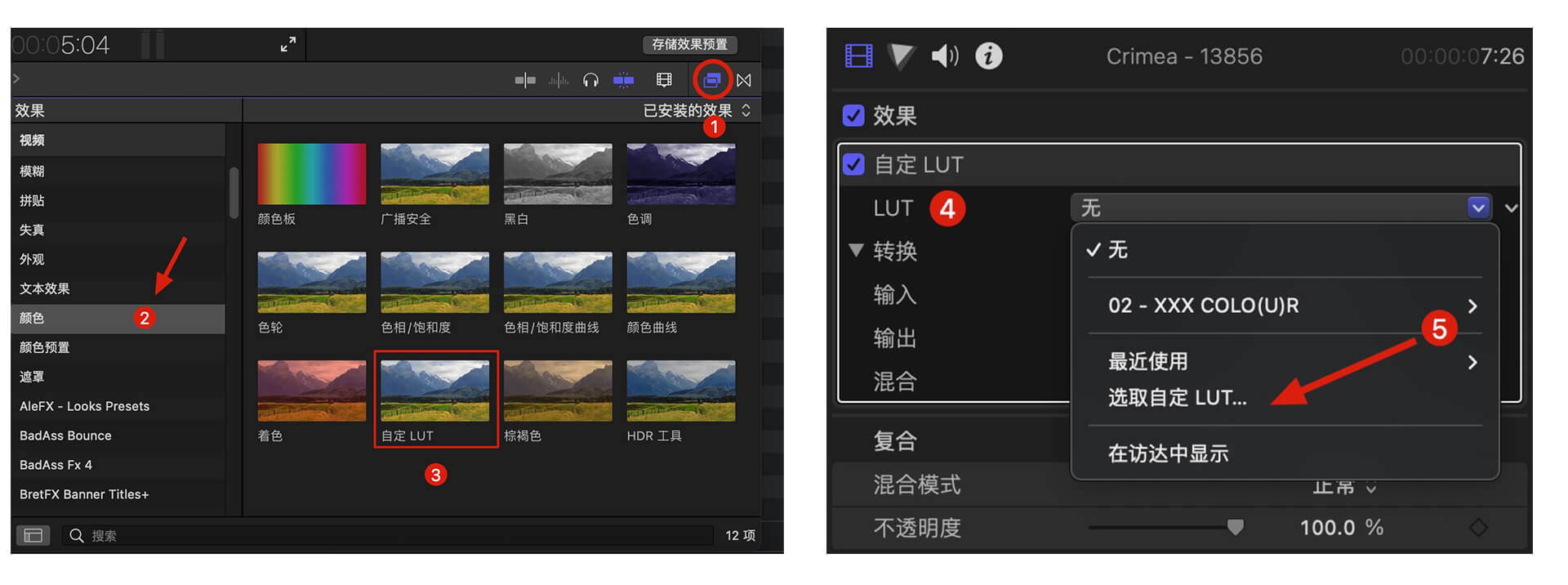 In the [LUT] parameter - [Select Custom LUT...], select the LUTS folder or .cube file you want to load.
Note: If you select the LUTS folder, you can load the entire folder and keep it in the [LUT] parameter for easy classification management, but try to avoid using Chinese characters and special characters.
In the [LUT] parameter - [Select Custom LUT...], select the LUTS folder or .cube file you want to load.
Note: If you select the LUTS folder, you can load the entire folder and keep it in the [LUT] parameter for easy classification management, but try to avoid using Chinese characters and special characters.
Premiere Pro
How to Load LUTs in Premiere Pro
First, open the following path:
- Mac system: /Library/Application Support/Adobe/Common/LUTs
- Windows system: \Program Files\Adobe\Common\LUTs Copy LUTs such as "Log to Rec709" to the folder above. Note: For easy classification, you can create a new folder under the path above.
DaVinci Resolve
How to Load LUTs in DaVinci Resolve
First, open the following path:
- Mac system: Macintosh HD/Library/Application Support/Blackmagic Design/DaVinci Resolve/LUT
- Windows system: C:\ProgramData\Blackmagic Design\DaVinci Resolve\Support\LUT Copy LUTs such as "Log to Rec709" to the folder above.
🚀Direct Download Link
Contact us on 💬WhatsApp for premium access and support.