Daniel Chiang Cinematic LUTs Collection
Last updated: Oct 24 2025
https://ko-fi.com/s/af458878e5
Overview
Daniel Chiang Cinematic LUTs Collection is a set of professional color grading LUTs presets created by renowned artist Daniel Chiang. These LUTs can be directly applied to rec.709 color space, easily adding emotional and cinematic atmosphere to your videos. Highly recommended for learning and reference!
info
LUT Information:
- Compatible Systems: Windows and Mac
- Supported Software: Compatible with Sony Vegas, Premiere Pro CC, After Effects CC, FCPX, DaVinci Resolve, and more
- File Format: .CUBE format
- File Size: Approximately 21MB
- Download Format: .zip file
Features
- Clean Commercial: Keep it clean and crisp, works great with interviews and commercials that don't need too much color
- K Drama: The Netflix-style Korean drama color look
- Golden Sunset: Perfect golden color for sunset and sunrise scenes
- Teal & Orange: Classic teal and orange cinematic look
- Red Magic: Makes your "Red" look more stand out and cinematic
- Mr. Joker: Designed for achieving the "Joker" look, best used with low-key lighting style
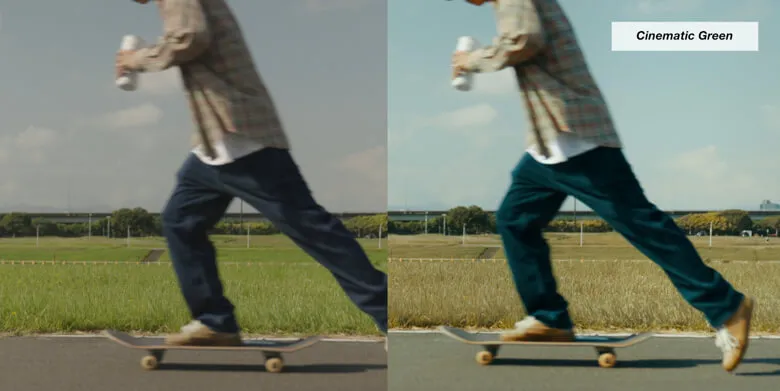
- Cinematic Green: Perfect for wood and grass environments
- California: Chill, peaceful California color palette
Installation Instructions
Final Cut Pro X
- Open FCPX software
- Find the "Effects" panel → "Color" → "Custom LUT" and add to your video
- In the "LUT" parameter - "Select Custom LUT..." choose your LUT folder or .cube file
- If selecting a LUT folder, the entire folder will be loaded and preserved in the "LUT" parameter for easy classification management
- Note: Avoid using Chinese characters and special characters
Premiere Pro
- Open the following path:
- Mac:
/Library/Application Support/Adobe/Common/LUTs - Windows:
C:\Program Files\Adobe\Common\LUTs
- Mac:
- Copy your LUTs to the above folder
- For easy categorization, you can create new folders in the above path
DaVinci Resolve
- Open the following path:
- Mac:
Macintosh HD/Library/Application Support/Blackmagic Design/DaVinci Resolve/LUT - Windows:
C:\ProgramData\Blackmagic Design\DaVinci Resolve\Support\LUT
- Mac:
- Copy your LUTs to the above folder
Product Images
🚀Direct Download Link
Get Premium Download Speed Without any Limitations!
Contact us on 💬WhatsApp for premium access and support.