Project Sorter V1.75 by Leyero
 Project Sorter automatically organizes your media imports by type, path, or metadata
Last updated: February 26, 2026
Developer: Leyero
Distribution: aescripts (aeScripts)
Official Source: aescripts.com/project-sorter
📋 Quick Overview
- Automatic Media Sorting - Sort imports by file type, metadata, or file path
- Dual Application Support - Works with Premiere Pro and After Effects (2022+)
- Smart Binning - Auto-create bins based on custom filter rules
- Batch Operations - Move, rename, label, and update metadata in bulk
- Persistent Settings - Filter collections saved across projects
- Price: $50 USD (commercial license)
Project Sorter by Leyero is a powerful automation script that eliminates manual media organization in Adobe Premiere Pro and After Effects. Think of it as a intelligent post office clerk for your media files—automatically sorting imports into organized bins based on your custom rules, saving hours of tedious project management work.
🎯 What Problem Does Project Sorter Solve?
The Challenge of Media Management
Working on large-scale video projects—documentaries, commercial productions, or narrative films—often means managing hundreds or thousands of media files. Manual organization requires:
- Creating bins and folder structures
- Sorting files by type, camera, or shoot day
- Renaming clips for consistency
- Applying labels and metadata
- Maintaining organization throughout the project
This process can consume hours of valuable editing time before you even begin creative work.
The Project Sorter Solution
Project Sorter automates this entire workflow. Simply import your media (even via drag-and-drop directly into the timeline), and the script automatically:
- Identifies each file's properties
- Categorizes based on your predefined rules
- Creates bins and organizes files accordingly
- Renames clips using metadata patterns
- Applies labels for visual organization
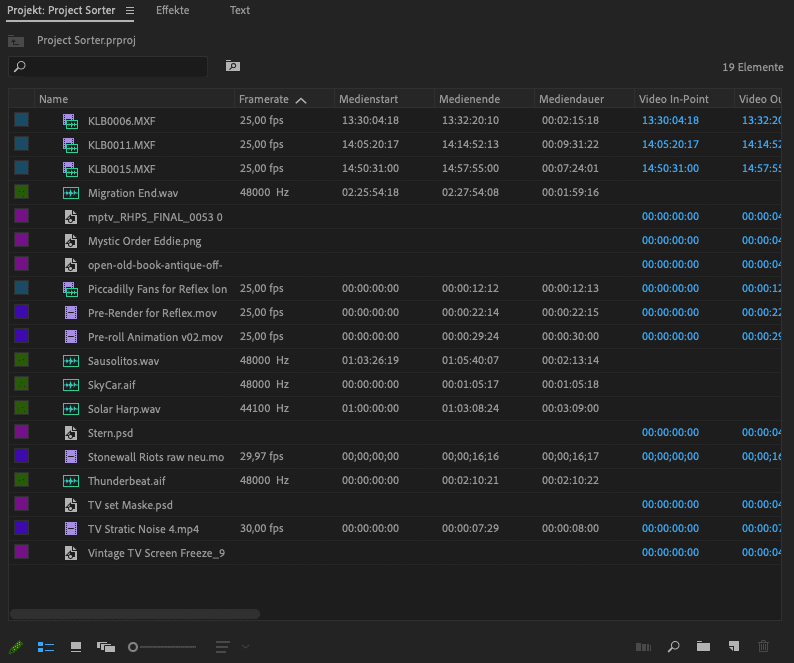 Project Sorter interface showing automatic media categorization by type and properties
✨ Key Features
Automatic Media Sorting
Define custom sorting rules using a flexible three-column filter system:
| Sort By | Examples |
|---|---|
| File Type | Video, Audio, Images, Graphics |
| File Extension | Separate PSD, PNG, JPG, MOV, MP4 |
| Resolution | HD (1920×1080), 4K (3840×2160), 6K+ |
| Frame Rate | 24fps, 25fps, 30fps, 60fps, 120fps |
| Alpha Channel | Files with or without transparency |
| Multicam Clips | Identify and group multicam footage |
| Creation Date/Time | Sort by when footage was recorded |
| File Path | Organize by source folder (shoot day, card number) |
Smart Metadata-Based Sorting
Project Sorter reads embedded metadata to create intelligent organization schemes:
- Camera identification - Group footage by camera source
- Date/time stamps - Organize by shoot date
- Clip naming patterns - Extract info from original filenames
- Custom metadata fields - Use any embedded information
Automatic Renaming System
Transform cryptic camera filenames into descriptive, searchable names:
Before: KLB0011.MXF
After: 2025-01-15 14-32 cam-01.MXF
Rename patterns can include:
- Creation date
- Creation time
- Camera identifier
- Scene or take information
- Custom prefixes/suffixes
Batch Operations
Beyond sorting, Project Sorter enables bulk operations:
- Move - Relocate multiple files simultaneously
- Rename - Apply naming conventions across selections
- Label - Assign color labels for visual categorization
- Comment - Add notes and markers in bulk
- Metadata Updates - Modify embedded information
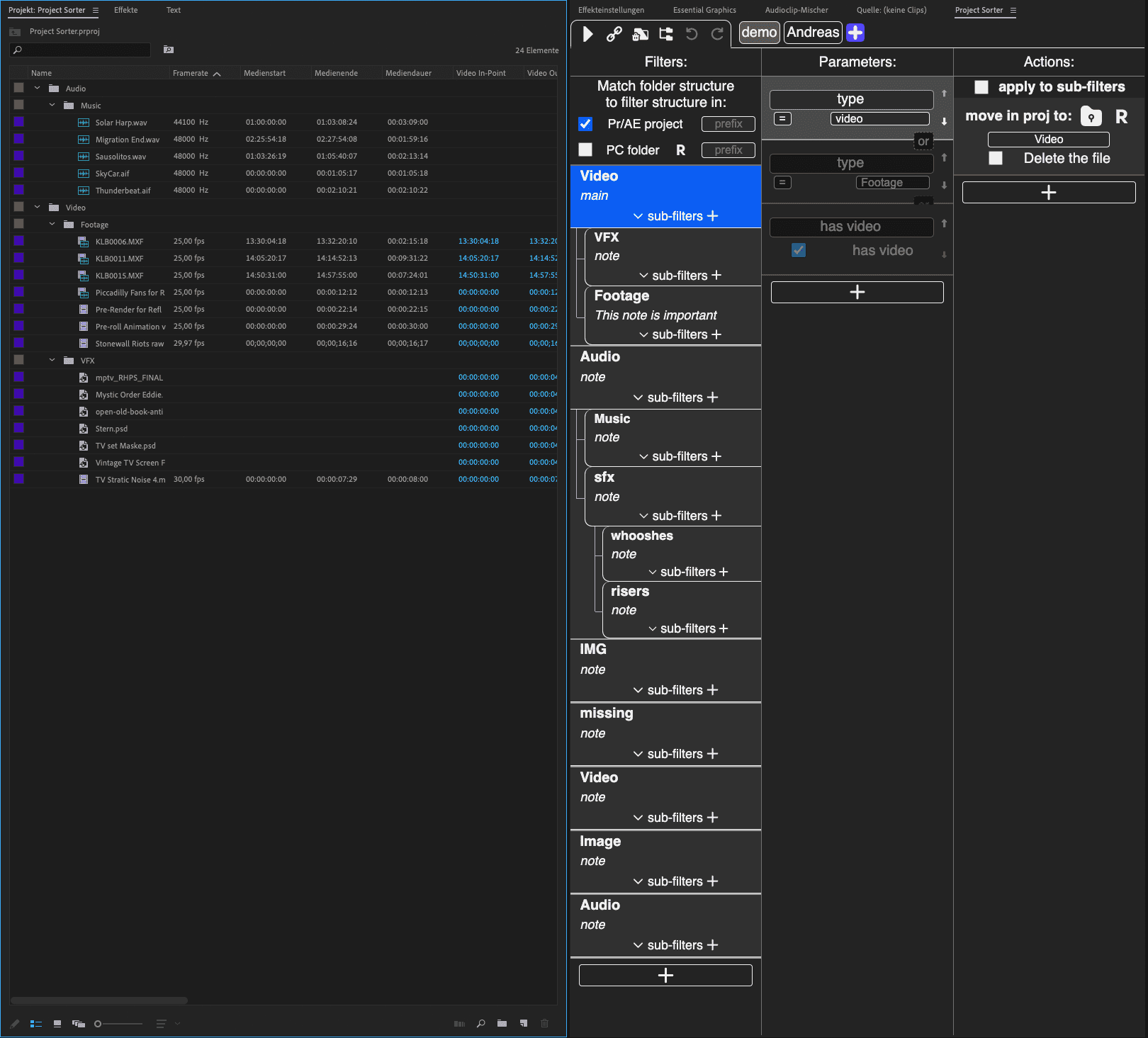 Demo settings included for quick start—customize filters per project
Persistent Filter Collections
Your sorting rules are automatically saved:
- Project-specific filters - Create custom rules per project
- Global collections - Reuse filters across multiple projects
- Quick activation - Enable/disable auto-sort with chain link button
- Demo settings included - Pre-configured basic sorting to get started
Auto-Scaling Feature
Automatically scale imported media to match your active frame size—ideal for mixed-resolution projects.
🛠️ Technical Specifications
| Specification | Details |
|---|---|
| Product Name | Project Sorter |
| Version | 1.75 (Latest) |
| Developer | Leyero |
| Distributor | aescripts (aeScripts) |
| Host Applications | Adobe After Effects, Adobe Premiere Pro |
| Minimum Version | 2022 or later (both applications) |
| Platform | Windows, macOS |
| Installation Method | Adobe Extensions (Window → Extensions menu) |
| Interface | Three-column filter mask for sorting parameters |
| License Type | Commercial |
| Price | $50 USD |
| Language | English |
System Requirements
| Requirement | Specification |
|---|---|
| Operating System | Windows 10/11 or macOS 10.15+ |
| Adobe Applications | After Effects 2022+ or Premiere Pro 2022+ |
| Internet Connection | Required for installation and activation |
| Adobe Account | Required for aescripts licensing |
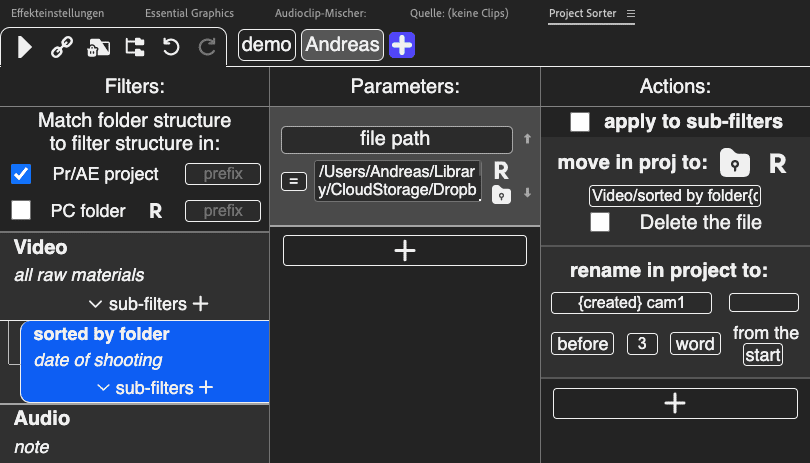 Configure sorting parameters by file type, resolution, frame rate, and metadata
📖 How to Use Project Sorter
Installation
- Purchase and download from aescripts.com
- Run the installer (included in download)
- Restart After Effects or Premiere Pro
- Access via Window → Extensions → Project Sorter
Basic Workflow
Step 1: Define Your Sorting Rules
Open Project Sorter and configure filters:
- Click "+" to add a new filter
- Column 1: Select parameter (File Type, Resolution, Frame Rate, etc.)
- Column 2: Choose condition (equals, contains, greater than, etc.)
- Column 3: Enter value (e.g., "4K", "MOV", "24")
- Name the bin where matching files will be sorted
Step 2: Enable Auto-Sort
Click the chain link button to toggle automatic sorting on/off.
Step 3: Import Media
- Drag and drop files directly into the timeline, or
- Use File → Import as normal
Project Sorter automatically sorts imports based on your rules.
Step 4: Apply Batch Operations (Optional)
Select multiple files and use Project Sorter to:
- Rename using metadata patterns
- Apply color labels
- Add comments or markers
- Update metadata fields
Advanced Techniques
Multi-Level Sorting
Create nested bin structures:
📁 Footage
  📁 4K
    📁 24fps
    📁 60fps
  📁 HD
    📁 24fps
    📁 30fps
📁 Audio
  📁 Music
  📁 SFX
  📁 Dialogue
📁 Graphics
  📁 PSD Files
  📁 PNG Sequences
Camera-Based Organization
For multi-camera shoots:
📁 Camera A (Sony FX6)
📁 Camera B (Sony A7S III)
📁 Camera C (DJI Drone)
📁 Audio (Zoom F6)
Date-Based Sorting
Organize by shoot day:
📁 Day 01 - 2025-01-15
📁 Day 02 - 2025-01-16
📁 Day 03 - 2025-01-17
💡 Ideal Use Cases
Documentary Production
- Hundreds of hours of interview footage
- Multiple camera sources requiring separation
- Chronological organization by shoot date
- Automatic labeling for B-roll categories
Commercial Video Production
- Multiple product shots by angle and lighting
- Talent footage organized by actor/scene
- Graphics and motion elements separated by type
- Audio tracks categorized by type (music, SFX, voiceover)
Narrative Film & Series
- Scene-based organization from dailies
- Camera source separation (A-cam, B-cam, drone)
- VFX shots isolated for post pipeline
- Sound files organized by type and scene
YouTube & Content Creation
- Rapid turnaround projects needing quick organization
- Multi-camera podcasts with separate audio
- Screen recordings mixed with camera footage
- Stock assets integrated with original content
Motion Graphics Projects
- Asset libraries with hundreds of elements
- Animation sequences organized by scene
- 3D renders separated by pass or element
- Audio components for timing reference
⚠️ Important Considerations
What Project Sorter Does NOT Do
- Does not organize existing projects - Works on new imports
- Does not move files on disk - Only organizes within project bins
- Does not transcode media - Organization only, no format conversion
- Not a backup tool - Does not duplicate or archive files
Technical Limitations
- Requires AE/PR 2022 or later - Not compatible with older versions
- English interface recommended - Some features may have issues with localized Adobe versions
- Network file access - Ensure preferences allow scripts to access network files
Best Practices
- Define rules before importing - Set up filters before bringing in media
- Test with small batch first - Verify sorting behavior with a few files
- Save filter collections - Export successful configurations for reuse
- Combine with naming conventions - Use consistent camera/card naming on set
- Review auto-sorted bins - Quick check ensures nothing miscategorized
🏢 About Leyero & aescripts
Leyero (Developer)
Leyero is a plugin developer specializing in workflow automation tools for video editors and motion designers. Known for creating practical solutions to common post-production challenges.
aescripts (Distribution Platform)
aescripts + aeplugins is the industry's leading marketplace for After Effects and Premiere Pro extensions, scripts, and plugins. Founded in 2010, aescripts distributes products from independent developers worldwide, providing:
- Secure licensing and activation
- Customer support infrastructure
- Regular product updates
- Community forums and tutorials
Official Store: aescripts.com
📊 Product Comparison
Project Sorter vs. Manual Organization
| Feature | Project Sorter | Manual Sorting |
|---|---|---|
| Time Investment | Automatic (seconds) | Hours per project |
| Consistency | 100% rule-based | Human error prone |
| Scalability | Handles 1000+ files easily | Becomes unwieldy |
| Reusability | Save filter collections | Start from scratch each time |
| Cost | $50 one-time | Free (but time = money) |
| ROI | Pays for itself in 1-2 projects | Ongoing time cost |
Project Sorter vs. Alternative Tools
| Tool | Price | AE Support | PR Support | Auto-Sort | Metadata Sorting |
|---|---|---|---|---|---|
| Project Sorter | $50 | ✅ | ✅ | ✅ | ✅ |
| Adobe Bridge | Free | ⚠️ Limited | ⚠️ Limited | ❌ | ️ Basic |
| CatDV | $300+ | ✅ | ✅ | ⚠️ Manual | ✅ |
| Kyno | Discontinued | ✅ | ✅ | ⚠️ Manual | ✅ |
| Post Haste | Free | ❌ | ❌ | ❌ | ❌ |
🚀 Get Project Sorter
Official Purchase (Recommended)
Support the developer and get the authentic product with license and updates:
- Price: $50 USD
- Link: aescripts.com/project-sorter
- Benefits: Commercial license, lifetime updates, developer support
Premium Access Support
Contact us on 💬WhatsApp for premium access and support.
:::
❓ Frequently Asked Questions
Q: Does Project Sorter work with existing project files?
A: Project Sorter primarily works on new imports. Existing media would need to be re-imported to trigger automatic sorting.
Q: Can I use Project Sorter on both Windows and Mac?
A: Yes, Project Sorter is fully compatible with both Windows 10/11 and macOS 10.15 or later.
Q: Do I need to install separately for After Effects and Premiere Pro?
A: No, a single installation works with both applications (2022 or later).
Q: Can I share my filter collections with team members?
A: Yes, filter settings are saved and can be exported/shared with other users.
Q: Does Project Sorter work with proxy files?
A: Yes, Project Sorter sorts based on file properties regardless of whether files are proxies or originals.
Q: What happens if I disable auto-sort?
A: Clicking the chain link button toggles auto-sort off. Files import normally without automatic binning until re-enabled.
Q: Can I sort by custom metadata fields?
A: Project Sorter reads standard metadata fields. Custom XMP fields may work depending on how they're embedded.
Q: Is there a trial version available?
A: Check the aescripts product page for current trial or demo availability.
Q: Does the license cover multiple computers?
A: aescripts licenses typically allow installation on multiple machines for a single user. Check current licensing terms at purchase.
📚 Additional Resources
Official Resources
- Product Page: aescripts.com/project-sorter
- Developer: Leyero
- aescripts Support: aescripts.com/contact
Tutorials & Learning
- Official Tutorial: YouTube - Project Sorter Tutorial
- Article: Work Hard, Sort Fast: Project Sorter 1.75
Related Workflow Tools
- Consider pairing with Adobe Bridge for pre-import organization
- CatDV for enterprise-level media management
- Post Haste for project template structure