Gamut Emma K LUTs - Premium Wedding Video Color Grading Presets
Last updated: Oct 24 2025
Overview
Professional film-grade wedding video color grading LUTs with soft skin tones, warm highlights, and natural colors. This set, created by Gamut, is specifically designed for wedding producers to enhance depth and consistency in all lighting conditions, creating a sophisticated and realistic visual effect.
Features
- Soft skin tones and warm highlights
- Natural color reproduction
- Enhanced depth and consistency
- Perfect for wedding footage in all lighting conditions
- Five different variations included
Contents
- Emma K – Bold
- Emma K – Bright
- Emma K – Soft
- Emma K – Warm
- Emma K – B&W (Black & White)
Contact us on 💬WhatsApp for premium access and support.
Compatibility
Windows
- Compatible with Sony Vegas, Premiere Pro CC, After Effects CC, FCPX, DaVinci Resolve
- LUT format: .CUBE
- File size: Approximately 3MB
- Transfer format: .zip file
Mac
- Compatible with Sony Vegas, Premiere Pro CC, After Effects CC, FCPX, DaVinci Resolve
- LUT format: .CUBE
- File size: Approximately 3MB
- Transfer format: .zip file
Installation Guide
Final Cut Pro X
- Open FCPX software, find the [Effects] panel - [Color] - [Custom LUT] and add it to the video
- In the [LUT] parameter - [Select Custom LUT...] select the LUTS folder or .cube file you want to load
- Note: If you select the LUTS folder, you can load the entire folder and keep it in the [LUT] parameter for easy classification management, but try not to use Chinese characters and special characters
Premiere Pro
First open the following path: Windows: \Program Files\Adobe\Common\LUTs Copy for example "Log to Rec709" LUTs to the folder above. Note: For easy classification, you can create a new folder in the path above.
DaVinci Resolve
First open the following path: Windows: C:\ProgramData\Blackmagic Design\DaVinci Resolve\Support\LUT Copy for example "Log to Rec709" LUTs to the folder above.
LUT Variations
Emma K Signature Monochrome LUT
Transforms your wedding films into timeless black-and-white masterpieces. This LUT captures rich contrast and subtle grayscale tones, delivering a refined, elegant aesthetic. Designed to emphasize emotion and depth, it enhances every detail, from the shadows to the highlights, creating a cinematic, classic feel that evokes a sense of nostalgia and artistry.
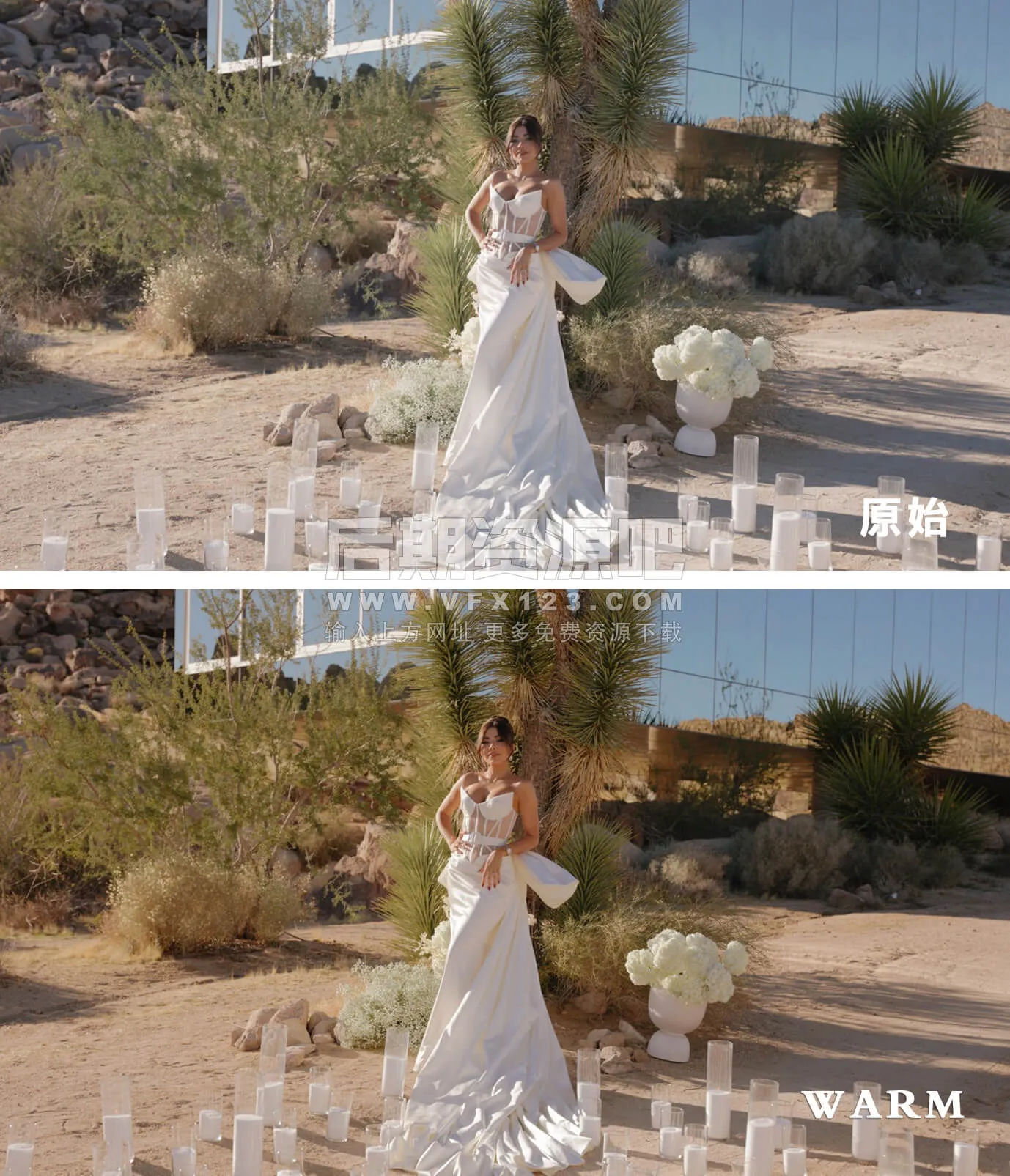
Emma K Warm LUT
Infuses your footage with rich, golden tones, enhancing warmth while maintaining natural colors. Ideal for intimate, romantic settings, it brings out soft, glowing skin tones and adds a cozy, inviting atmosphere to your wedding films, creating a timeless and heartfelt aesthetic.
Emma K Bright LUT
Adds radiant, vibrant tones to your footage while keeping colors natural and true to life. Perfect for bright, outdoor settings, it enhances the overall warmth and clarity, making your wedding films feel fresh and full of light without overwhelming the natural beauty of the day.
Emma K Bold LUT
Enhances your footage with vibrant, cinematic tones while preserving natural colors and skin tones. Designed for a consistent look across various lighting conditions, it adds depth and richness to wedding films, creating a dramatic yet authentic feel.
🚀Direct Download Link
Contact us on 💬WhatsApp for premium access and support.