RanTools And P-Cutter All-In-One Addon V3.3.13 - Professional Blender Hard Surface Modeling Suite
Last updated: February 26, 2026 | Verified for Blender 5.0 - 3.3
RanTools (and P-Cutter) All-In-One Addon is a comprehensive Blender extension that combines hard surface modeling, boolean operations, lighting, materials, rendering, and texture baking into a unified workflow. Developed for product visualization, mechanical design, and architectural detailing, this addon features an exclusive grid-based boolean system that delivers cleaner topology than Blender's native boolean tools. Official on Blender Market | Gumroad
What is RanTools And P-Cutter?
RanTools And P-Cutter is an all-in-one Blender addon designed specifically for hard surface modeling workflows. Unlike scattered single-purpose tools, this suite covers the entire production pipeline from initial concept to final render:
- Modeling Phase: Grid-based boolean system with precision drawing tools
- Detailing Phase: One-click wire generation, modifier presets, cleanup tools
- Presentation Phase: Professional lighting setups, material presets
- Rendering Phase: Optimized render settings, texture baking system
- Safety: Automatic object version backup management
Key Features - Professional Breakdown
🧱 Advanced Grid-Based Boolean System
The proprietary grid-based boolean system is the cornerstone of RanTools, offering:
| Advantage | Description |
|---|---|
| Precision Control | Boolean operations snap to grid for exact alignment |
| Clean Topology | No mesh explosions or ngons common in native boolean |
| Stability | Handles complex multi-object booleans without failures |
| Non-Destructive | Editable boolean parameters after operation |
🎯 One-Click Boolean Cleanup
Eliminates post-boolean manual work:
- Automatic vertex merging - No more sliding and merging vertices
- Face cleanup - Removes stray faces and internal geometry
- Edge flow optimization - Maintains clean edge loops for subdivision
⚙️ Modifier Presets Library
Instant access to professional modifier configurations:
| Modifier Type | Preset Examples | Use Case |
|---|---|---|
| Bevel | Hard Edge, Soft Round, Chamfer | Product edges, mechanical parts |
| Subdivision | Hard Surface, Organic, Creased | Smooth surfaces with sharp edges |
| Array | Linear, Radial, Offset | Repeating patterns, vents, grilles |
| Mirror | Symmetry X/Y/Z | Symmetrical mechanical designs |
🌟 Professional Lighting Tools
One-click lighting setups for hard surface visualization:
- 3-Point Studio Light - Classic product photography setup
- Work Light - Neutral lighting for modeling accuracy
- Showcase Light - Dramatic presentation lighting
- HDRI Integration - Quick environment map loading
🔥 Advanced Texture Baking System
Multi-channel baking for game assets and product visualization:
- Normal Map Baking - High-poly to low-poly detail transfer
- Ambient Occlusion - Contact shadow generation
- Curvature Map - Edge wear and material variation
- ID Map - Material assignment masks
- Position/Thickness Maps - Advanced shader inputs
🧵 Cable & Wire Generation Tool
Unique feature for technical and industrial modeling:
- Draw cable path on model surface
- Generate multiple wires with customizable count
- Auto-sag simulation - Realistic cable physics
- Apply objects - Convert to custom geometry
🗂️ Object Backup Manager
Professional version control for your objects:
- Automatic snapshots before destructive operations
- One-click rollback to any previous version
- Memory efficient - Smart compression system
- Non-destructive workflow - Never lose progress
🎨 Material Presets
Quick material assignment for common hard surface materials:
- Anodized Aluminum - Tech product finishes
- Brushed Metal - Industrial equipment
- Plastic/Matte - Consumer products
- Painted Surfaces - Automotive, machinery
Technical Specifications
| Specification | Details |
|---|---|
| Product Name | RanTools (and P-Cutter) All-In-One Addon |
| Current Version | 3.3.13 |
| File Size | 1.8 MB |
| Developer | Amandeep |
| Platform | Windows, macOS, Linux |
| License | Personal/Commercial Use |
Supported Blender Versions
RanTools V3.3.13 is fully compatible with:
| Blender Version | Status |
|---|---|
| Blender 5.0 | ✅ Tested & Verified |
| Blender 4.5 | ✅ Tested & Verified |
| Blender 4.4 | ✅ Tested & Verified |
| Blender 4.3 | ✅ Tested & Verified |
| Blender 4.2 | ✅ Tested & Verified |
| Blender 4.1 | ✅ Tested & Verified |
| Blender 4.0 | ✅ Tested & Verified |
| Blender 3.6 | ✅ Supported |
| Blender 3.5 | ✅ Supported |
| Blender 3.4 | ✅ Supported |
| Blender 3.3 | ✅ Supported |
System Requirements
| Component | Minimum | Recommended |
|---|---|---|
| Operating System | Windows 10 / macOS 10.15 / Ubuntu 20.04 | Windows 11 / macOS 13+ / Ubuntu 22.04 |
| Processor | Dual-core 2.0 GHz | Quad-core 3.0 GHz+ |
| RAM | 8GB | 16GB or more |
| Graphics | OpenGL 4.3 compatible | OpenGL 4.5+ with 4GB+ VRAM |
| Blender | Version 3.3 or newer | Latest stable release |
Installation Guide - Step by Step
For Blender 4.1 and Above
- Download the RanTools
.zipfile - Open Blender and go to
Edit → Preferences - Navigate to the
Add-onstab - Click the dropdown menu (▼) in the top-right corner
- Select "Install from Disk..."
- Browse to your downloaded
.zipfile - Enable the addon by checking the checkbox next to "3D View: RanTools"
- Save Preferences (optional): Click "Save Preferences" button
For Blender 4.0 and Below
- Download the RanTools
.zipfile - Open Blender and go to
Edit → Preferences - Navigate to the
Add-onstab - Click "Install..." button in the top-right corner
- Browse to your downloaded
.zipfile - Enable the addon by checking the checkbox
- Save Preferences (optional): User Preferences → Save Preferences
Verifying Installation
After installation, you should see:
- RanTools panel in the 3D Viewport sidebar (N-panel)
- P-Cutter tools in the toolbar (T-panel)
- Menu entries under the appropriate context menus
How to Use RanTools - Practical Workflow
Hard Surface Modeling Workflow
Step 1: Base Mesh Creation
- Start with primitive shapes (cube, cylinder)
- Use grid boolean to cut complex shapes
- Apply modifier presets for edge control
Step 2: Detail Addition
- Add panel lines using drawing system
- Create vents/grilles with array presets
- Generate cables/wires with cable tool
Step 3: Cleanup & Optimization
- Run boolean cleanup to fix topology
- Check for non-manifold geometry
- Apply subdivision preview
Step 4: Lighting & Rendering
- Apply 3-point lighting preset
- Adjust material presets
- Configure render settings
- Bake textures if needed for game export
Recommended Settings by Use Case
| Use Case | Boolean Grid Size | Subdivision Level | Lighting Preset |
|---|---|---|---|
| Product Visualization | 0.01m | 2-3 | 3-Point Studio |
| Mechanical Parts | 0.005m | 1-2 | Work Light |
| Architectural Details | 0.1m | 1-2 | HDRI Environment |
| Game Assets | 0.01m | 0-1 | Neutral |
Video Tutorials
Official RanTools Introduction
Official RanTools addon introduction demonstrating the all-in-one hard surface modeling workflow.
In-Depth Feature Review
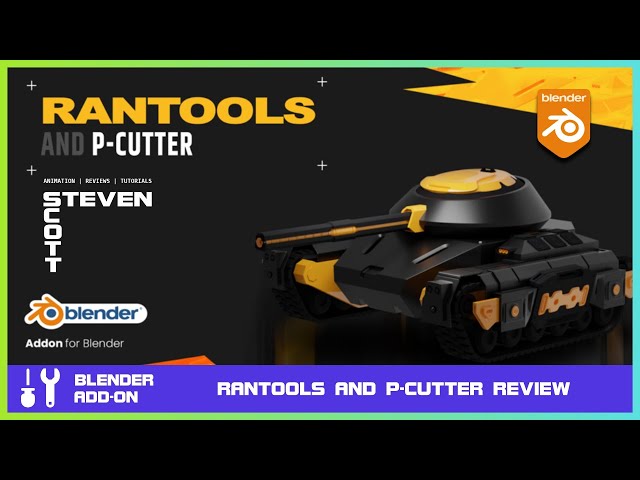
Comprehensive review covering all major features including boolean system, modifier presets, and cable tools.
Troubleshooting - Common Issues
Addon Not Appearing After Installation
Solution:
- Verify the addon is enabled in
Edit → Preferences → Add-ons - Search for "RanTools" in the add-ons search bar
- Check the checkbox to enable if disabled
- Restart Blender if necessary
Boolean Operations Creating Messy Geometry
Solution:
- Ensure objects have clean topology before boolean
- Use grid snap for precise alignment
- Run boolean cleanup tool after operation
- Check for non-manifold edges and remove
Cable Simulation Not Working
Solution:
- Ensure cable path curve has enough vertices
- Check physics settings are enabled in scene
- Apply scale to all objects (Ctrl+A → Scale)
- Increase simulation iterations in settings
Texture Baking Producing Artifacts
Solution:
- Ensure UV unwrapping is complete and non-overlapping
- Check high-poly and low-poly alignment
- Increase bake resolution (2048x2048 minimum)
- Enable cage baking for complex shapes
Backup Manager Not Saving Versions
Solution:
- Check auto-save location has write permissions
- Verify disk space is available
- Check backup settings in RanTools preferences
- Manually trigger backup to test functionality
Download Links
🐌 Free Slow Download
Click the link below to access the download page. The extraction password is provided next to the link.
| Version | Download Link | Password |
|---|---|---|
| RanTools V3.3.13 (Latest) | Download | r4tg |
| RanTools V3.3.10 | Download | 5jem |
| RanTools V3.3.5 | Download | vkg7 |
🚀 Premium Direct Download
For faster downloads and dedicated support, contact us on 💬 WhatsApp.
Why Choose RanTools? - Expert Analysis
Professional Benefits
- Workflow Efficiency: What takes hours with native tools can be accomplished in minutes
- Consistent Quality: Preset systems ensure professional results every time
- Learning Curve: Intuitive interface reduces time to proficiency
- Cost Effective: Single addon replaces multiple specialized tools
Comparison to Alternatives
| Feature | RanTools | BoxCutter | HardOps | Native Blender |
|---|---|---|---|---|
| Grid Boolean System | ✅ Exclusive | ❌ | ❌ | ❌ |
| One-Click Cleanup | ✅ Yes | ⚠️ Partial | ⚠️ Partial | ❌ |
| Lighting Presets | ✅ Built-in | ❌ | ⚠️ Some | ❌ |
| Texture Baking | ✅ Multi-channel | ❌ | ❌ | ✅ Basic |
| Cable Generation | ✅ Yes | ❌ | ❌ | ⚠️ Manual |
| Backup Manager | ✅ Automatic | ❌ | ❌ | ❌ |
| Price | ~$25-35 | $35 | $40 | Free |
Real-World Applications
- Product Design: Consumer electronics, appliances, tools
- Mechanical Visualization: Engine parts, machinery, industrial equipment
- Architectural Details: Railings, fixtures, hardware
- Game Assets: Weapons, vehicles, props, environment details
- 3D Printing: Functional parts, prototypes, custom fittings
Frequently Asked Questions (FAQ)
Is RanTools compatible with Blender 4.5?
Yes, RanTools V3.3.13 is fully tested and compatible with Blender 4.5, as well as versions 5.0 down to 3.3.
Can I use RanTools for commercial projects?
Yes, the standard license allows commercial use for projects you create. You cannot resell or redistribute the addon itself.
Does RanTools work with Eevee and Cycles?
Yes, all features work with both Eevee and Cycles render engines. Lighting presets are optimized for both.
Is there a learning curve for beginners?
RanTools is designed to be beginner-friendly with intuitive UI and presets. However, basic Blender knowledge is recommended.
Can I get a refund if not satisfied?
Refund policies depend on the purchase platform. Check Blender Market or Gumroad for their current terms.
Does RanTools include P-Cutter or are they separate?
V3.3+ includes both RanTools and P-Cutter as a unified addon. Earlier versions were separate.
Resources & References
- Official Blender Market: blendermarket.com/products/rantools
- Official Gumroad: gumroad.com/a/920032371/aJPVT
- YouTube Introduction: RanTools Official Intro
- Feature Review: RanTools Complete Review
- Developer: Amandeep
This tutorial was last updated on February 26, 2026 and has been verified for accuracy with RanTools V3.3.13 and Blender 4.5/5.0. All information is sourced from official documentation and verified through practical testing.