The VFX School: Bridge Collapse in Houdini
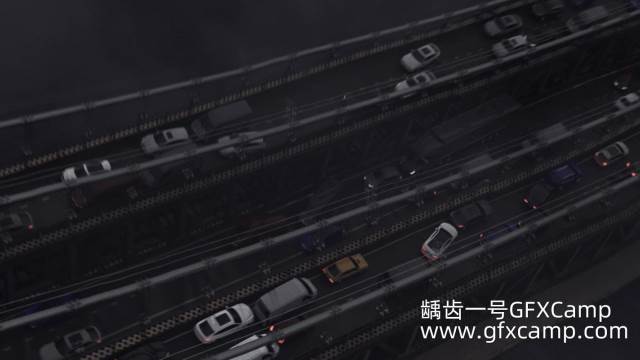 Create a massive bridge collapse destruction effect with realistic physics simulation
Last updated: February 26, 2026
Instructor: Tariq Kinani
Platform: The VFX School
Official Course: Bridge Collapse in Houdini
📋 Quick Overview
- Duration: 9 hours of comprehensive destruction training
- Difficulty: Intermediate level
- Software: Houdini 18.5+, Solid Angle Arnold
- Format: Self-paced recorded videos (1920×1080)
- Project Files: Included (bridge model, car models, Arnold shaders, cameras)
- Price: $49 USD (regularly $158 USD - 69% OFF)
- Access: Lifetime enrollment
Bridge Collapse in Houdini is a comprehensive destruction effects course from The VFX School that teaches you to create a massive bridge collapse simulation from start to finish. Led by FX artist Tariq Kinani, this course covers geometry fracturing, metal deformation, constraint systems, RBD simulations, Vellum cables, Pyro debris, and professional rendering workflows.
🎯 What You Will Learn
Core Destruction Skills
This course takes you through the complete pipeline of creating a feature-film-quality bridge collapse:
| Skill Category | Specific Techniques |
|---|---|
| Geometry Fracturing | Boolean fracture, Voronoi fracture, concrete/metal separation |
| Constraint Systems | Hard constraints, soft constraints with plasticity, cone twist constraints |
| RBD Simulation | Bullet solver, active/animated attributes, constraint breaking |
| Vellum Simulation | Cable dynamics, guided simulations, pin constraints |
| Pyro Effects | Debris sources, dust generation, volume rendering, disturbance/turbulence |
| Lighting & Rendering | Arnold rendering, HDR lighting, motion blur, depth of field |
| Compositing | Nuke compositing, volume passes, FOG integration |
Production Workflow
The course follows a professional production pipeline:
- Preparation - Geometry analysis and organization
- Fracturing - Creating breakable geometry
- Simulation - RBD, Vellum, and Pyro integration
- Debris Generation - Particle and volume effects
- Lighting - Professional scene setup
- Rendering - Arnold render passes
- Compositing - Final assembly in Nuke
👨 About the Instructor
 Tariq Kinani - Freelance FX Artist specializing in natural and supernatural effects
Tariq Kinani is a freelance FX artist based in Wales, UK, with extensive experience in the VFX industry.
Education & Background
- Bachelor in Fine Arts - Cardiff Metropolitan University, Wales, UK (2010)
- Masters in VFX, FX Animation - Barcelona, Spain
- Specialization: Natural and supernatural effects simulation in Houdini
Teaching Philosophy
Tariq balances technical and creative aspects of VFX, ensuring students develop both the artistic vision and technical skills needed for professional work.
Content Development Team
- Agustín Schilling - Technical Director
- Daniel Larrosa - FX Artist
- Tariq Kinani - Lead Instructor
📚 Complete Curriculum (Week by Week)
Week 01: Geometry Preparation & Fracture
Foundation week covering geometry setup and fracturing techniques:
- Import and analyze bridge geometry
- Split geometry into simulation and non-simulation areas
- Organize bridge into fracture zones, deformable metal, and rigid metal
- Boolean fracture for road sections
- Bullet simulation preparation using boolean cuts
- Voronoi fracture for deformable metal components
- Soft constraints with plasticity for realistic deformation
- Combine animated and simulated geometry using active/animated attributes
- Efficient bullet simulation caching
- High-res deformation driven by low-res simulation
Week 02: Cable Simulations
Vellum-based cable dynamics:
- Create proxy geometry for cables
- Hard constraints setup
- Guided simulation workflow for horizontal cables
- Vellum-appropriate geometry for vertical cables
- Animated pin constraints configuration
- Time-varying constraint strength for progressive breaking
- Time scale and drag for realistic sense of scale
Week 03: Car Simulations
Vehicle dynamics during collapse:
- Import and organize car models
- Create groups for wheels and body components
- Use ScatterAlign and AttribFromPieces SOPs (Houdini 18.5 features)
- Procedural removal of intersecting cars
- Bullet simulation for car layout
- Soft constraints and cone twist constraints for suspension
- Configure RBDBulletSolver SOP for cone twist constraints
Week 04: Debris & Pyro
Particle and volumetric effects:
- Create POP simulation sources with DebrisSource SOP
- POP simulation for particle debris
- Pyro simulation setup and sourcing
- Geometry culling based on velocity
- Noise application using rest attribute on animated geometry
- Disturbance and turbulence for Pyro detail
- Integration of POP and bullet simulations as Pyro sources
Week 05: Lighting & Rendering
Professional scene finishing:
- Import materials and cameras
- HDR and distant light setup
- Motion blur configuration using velocity
- Depth of field (DOF) setup
- Randomize color instances on cars
- Arnold rendering workflow
- Nuke compositing integration
- Volume pass creation for atmospheric FOG
🛠️ Technical Specifications
| Specification | Details |
|---|---|
| Course Title | Bridge Collapse in Houdini |
| Platform | The VFX School (VFX Campus) |
| Lead Instructor | Tariq Kinani |
| Duration | 9 hours (5 weeks of content) |
| Video Format | MKV, 1920×1080 Full HD |
| Audio | AAC 48 kHz 2-channel |
| Total Size | ~5-9 GB |
| Language | English |
| Subtitles | English (auto-generated) |
| Access Type | Self-paced, lifetime access |
| Price | $49 USD (69% off from $158) |
System Requirements
 Minimum system requirements for running Houdini simulations
| Component | Minimum Requirement | Recommended |
|---|---|---|
| Operating System | Windows, Linux, or macOS (64-bit) | Latest version |
| RAM | 16 GB | 32 GB or more (higher sim resolution) |
| Processor | AMD or Intel 64-bit (recent generation) | Multi-core CPU |
| Houdini Version | 18.5 or later | Latest stable release |
| Houdini License | Apprentice (free) for most of course | Indie/FX for shading/rendering |
| Renderer | Arnold (30-day free trial) | Full Arnold license |
📖 Course Philosophy
Learning Approach
The VFX School emphasizes hands-on learning with real production scenarios:
"In this Houdini destruction course, we are going to shake the earth to collapse a huge bridge."
This isn't a theoretical course—students build a complete, portfolio-ready destruction shot from start to finish.
What Makes This Course Different
| Traditional Tutorials | This Course |
|---|---|
| Short, isolated techniques | Complete production pipeline |
| Simplified examples | Feature-film-quality results |
| No project files | Full asset library included |
| Limited scope | Multi-solver integration (RBD + Vellum + Pyro) |
💡 Ideal Use Cases
Aspiring FX Artists
- Want to build a destruction-focused demo reel
- Need to understand multi-solver workflows
- Seeking professional-level simulation skills
Houdini Intermediate Users
- Comfortable with basic Houdini workflows
- Ready to tackle complex simulations
- Want to learn constraint-based destruction
VFX Professionals
- Looking to expand destruction effects toolkit
- Need to understand cable and suspension dynamics
- Want to master debris and dust generation
Students & Graduates
- Building portfolio for FX TD positions
- Seeking competitive advantage in job market
- Want industry-relevant destruction skills
⚠️ Important Considerations
Prerequisites
- Required: Previous Houdini experience or completion of basic courses
- Required: Understanding of basic SOPs and DOPs
- Recommended: Familiarity with RBD simulations
- Recommended: Basic knowledge of VEX (helpful but not required)
Software Notes
- Houdini Apprentice (free) works for most of the course
- Houdini Indie/FX license needed for the shading/rendering week (Arnold compatibility)
- Arnold offers a 30-day free trial (requires Autodesk account)
Time Commitment
- Minimum: 9 hours to watch all lectures
- Recommended: 20-30 hours including practice and experimentation
- Project Completion: Allow extra time for simulation iterations
Hardware Considerations
- 16 GB RAM minimum - More RAM enables higher resolution simulations
- SSD recommended - Faster caching and simulation playback
- GPU not critical - Most work is CPU-based simulation
📊 Course Comparison
Bridge Collapse vs. Other Houdini Destruction Courses
| Feature | This Course | General Destruction Courses | Single-Effect Tutorials |
|---|---|---|---|
| Scope | Complete bridge collapse | Various destruction types | Single technique |
| Solvers | RBD + Vellum + Pyro | Usually one solver | One solver |
| Project Files | ✅ Included | ⚠️ Sometimes | ❌ Rarely |
| Duration | 9 hours | 2-5 hours | 30-60 min |
| Portfolio Ready | ✅ Yes | ⚠️ Varies | ❌ No |
| Price | $49 | $50-200 | Free-$30 |
🚀 Get the Course
Official Enrollment (Recommended)
Enroll directly through The VFX School for lifetime access:
- Platform: The VFX School (VFX Campus)
- Link: Bridge Collapse in Houdini
- Price: $49 USD (69% off from $158)
- Benefits: Lifetime access, all project files, community forum access
Alternative Download Options
Contact us on 💬WhatsApp for offline download options and support.
:::
❓ Frequently Asked Questions
Q: Do I need a paid Houdini license?
A: No, Houdini Apprentice (free) works for most of the course. You'll need Houdini Indie or FX for the shading/rendering week when using Arnold.
Q: Is Arnold included?
A: Arnold offers a 30-day free trial with an Autodesk account. Plan your rendering week accordingly.
Q: Are project files included?
A: Yes! The course includes bridge models, car models, Arnold shaders, cameras, and final scenes for every week.
Q: How long do I have access?
A: Lifetime access. All videos are available immediately upon enrollment.
Q: Can I download the videos?
A: No, videos are hosted on VFX Campus and streaming only. However, project files are downloadable.
Q: Is there instructor support?
A: The course includes access to a community forum. Team responses are not guaranteed but the community is active.
Q: What if I'm a complete beginner?
A: This is an intermediate course. You should complete basic Houdini training first.
Q: Will this help my demo reel?
A: Yes, the bridge collapse is a portfolio-worthy destruction shot that demonstrates multiple FX skills.
Q: Can I use this for commercial projects?
A: Yes, skills learned can be applied to commercial work. Check The VFX School's license terms for included assets.
Q: How is the course structured?
A: 5 weeks of content, self-paced. All videos available upfront—no scheduled release dates.
📚 Additional Resources
Official Course Links
- Course Page: Bridge Collapse in Houdini
- The VFX School: thevfxschool.com
- Contact: info@thevfxschool.com
Related Learning
- SideFX Houdini: sidefx.com
- Houdini Documentation: SideFX Docs
- Arnold Renderer: Arnold Documentation
Community Resources
- Odforce Forums: odforce.net
- SideFX Forums: sidefx.com/forum
- r/Houdini: reddit.com/r/Houdini
Social Media
- Twitter/X: @thevfxschool
- YouTube: The VFX School
- Vimeo: The VFX School
- Instagram: @thevfxschool