QuadSpinner Gaea V2.2.4.0 - Professional Terrain Design Software for VFX and Games
Last updated: February 26, 2026 | Verified for Windows 10/11
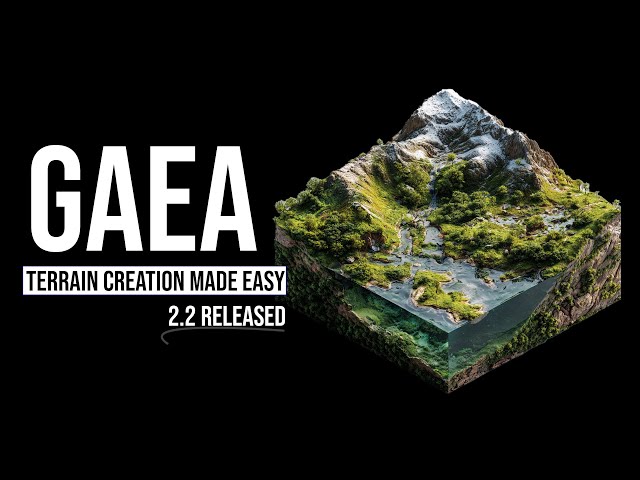
Gaea by QuadSpinner is the industry's most loved terrain design tool for VFX, games, and virtual production. Since 2014, Gaea has empowered artists from hobbyists to top studios like Wētā FX, CBS Studios, BBC Studios, Kojima Productions, and Lucasfilm Games. Version 2.2.4.0 introduces revolutionary Erosion_2 with Selective Precipitation, Ice simulation nodes (Glacier, IceFloe, Snowfield), and a completely rewritten Gaea2Houdini pipeline. Used by NASA, Netflix, Quixel/Epic Games, Sony, and Ubisoft.
What is QuadSpinner Gaea?
QuadSpinner Gaea is a cutting-edge terrain design software that puts geological technology in the hands of everyone from hobbyists to top VFX and game studios. Unlike traditional heightfield editors, Gaea uses real physics-based simulations to create believable terrains that scale from solo artists to powerhouse teams.
Why Professionals Choose Gaea
| Advantage | Description |
|---|---|
| Physics-Based Foundation | Real erosion, water flow, and thermal weathering simulations |
| 2.7D TOR Engine | Works between 2D and 3D space, packing higher detail into heightfields |
| Volume-Preserving Technology | Focus on results without losing terrain volume |
| Massive Scale Support | Up to 65 billion pixels (~8000 4K screens; at 1m/px could cover all of Ireland) |
| Industry Standard | Trusted by Wētā FX, Industrial Light & Magic, Ubisoft, Sony, Microsoft, NASA |
Gaea 2.2 Major Features - What's New
🌊 Erosion_2 with Selective Precipitation
The revolutionary Erosion_2 system represents the most sophisticated erosion simulation available:
| Feature | Benefit |
|---|---|
| Selective Precipitation | Limit rainfall by mask, slope, or altitude for precise control |
| Orographic Controls | Rain shadow simulation for accurate microclimates |
| GPU-Based Processing | Runs entirely on GPU for real-time feedback |
| Deterministic Output | Consistent, repeatable results every time |
| Mask-Driven Erosion | Paint exactly where erosion occurs |
| Direction Bias | Control wind and water flow direction |
🧊 Ice Simulation Nodes (New in 2.2)
Three powerful new nodes for arctic and alpine environments:
Glacier
- Converts snow and heightfields into detailed ice sheets
- Creates fluvially grooved surfaces with directional flow
- Generates complex substructure with internal ice layers
- Simulates thick ice accumulation on mountain slopes
IceFloe
- Simulates fractured, frozen terrain features
- Creates frozen chunks of ice along lakes and shorelines
- Perfect for arctic coastline scenes
- Realistic ice chunk distribution patterns
Snowfield
- Specialized snow coverage node for large environments
- Performs cascading snow simulation for realistic buildup
- Distinguishes between new snow and old snow layers
- Natural wind-driven accumulation patterns
🎯 New Nodes in Version 2.2
| Node | Purpose | Use Case |
|---|---|---|
| BlobRemover | Clean up noisy formations | Remove artifacts, isolate shapes |
| Distress | Surface weathering and decay | Add erosion details, aging effects |
| Shape | Primitive terrain shapes | Quick geometric base meshes |
| Scree | Rock debris scattering | Natural talus slopes, rock fields |
| Var | Variable manipulation | Advanced graph control systems |
| Shrubs | Low-lying vegetation | Bushes, grass, ground cover |
| Heal | Terrain repair (ported from Gaea 1) | Fix mesh issues, smooth transitions |
🔧 Major Node Updates
Trees - Complete Overhaul
- Layering system supports 3 Tree systems/biotopes
- Create intricate ecosystems with multiple vegetation types
- Aligned with Gaea 1's Arboreal node for familiarity
- More predictable and controllable results
Crater - Enhanced Placement
- Single crater placement mode (like Craterfield)
- Gizmo (Z) support for viewport movement
- Chain multiple Crater nodes for complex impact zones
Debris - High-Powered Efficiency
- New Scale control for accurate sizing
- More art-directable output
- Improved distribution algorithms
ThermalShaper - GPU Rewritten
- Faster GPU execution for real-time feedback
- Improved rock weathering simulation
- Better thermal erosion accuracy
🎨 Color and Workflow Enhancements
| Enhancement | Description |
|---|---|
| Colorized Mask Previews | Multiple gradient presets, viewport color palettes |
| ColorErosion | Added Diffusion control, HSL mode |
| WaterColor | No longer requires Guide input in Accumulation mode |
| Blur | Now supports color maps |
| GroundTexture | New simple Roughness mode |
📁 Examples Browser
Access to 60 new curated example files:
- Available from Start Dialog and File menu
- Includes complex production setups (e.g., Glacier Complex Setup)
- Learn from professional workflows
- Quick starting point for common terrain types
Technical Specifications
| Specification | Details |
|---|---|
| Product Name | QuadSpinner Gaea |
| Version | 2.2.4.0 |
| Developer | QuadSpinner |
| First Released | 2014 |
| Platform | Windows 10/11 (64-bit) |
| License | Perpetual (pay once, own forever) |
System Requirements
| Component | Minimum | Recommended |
|---|---|---|
| Operating System | Windows 10 (64-bit) | Windows 11 (64-bit) |
| Processor | Quad-core 2.5 GHz | 8-core 3.5 GHz+ |
| RAM | 16GB | 32GB or more |
| Graphics | DirectX 11 compatible, 4GB VRAM | RTX 3060 or better, 8GB+ VRAM |
| Storage | 2GB available space | SSD with 10GB+ free space |
| .NET Runtime | .NET 8.0 | .NET 8.0 |
Supported Integrations
| Integration | Status | Notes |
|---|---|---|
| Unreal Engine 5.6 | ✅ Production Ready | Gaea2Unreal Bridge (open source) |
| Houdini | ✅ Rewritten | Gaea2Houdini with TOR Processor SOP |
| Unity | ⚠️ Via heightmap export | Standard heightmap/normal map export |
| Blender | ⚠️ Via heightmap export | Displacement map workflow |
| Maya | ⚠️ Via heightmap export | Standard displacement workflow |
Pricing & Licensing
| Edition | Price | Resolution Cap | Best For |
|---|---|---|---|
| Community | Free | 1K | Hobbyists, learning |
| Indie | $99 USD | 8K | Freelancers, small studios (under $100K/year) |
| Professional | $199 USD | 256K | Professional studios |
| Enterprise | $299 USD | 256K | Large teams, volume licensing |
Note: Education pricing available. Floating licenses for teams.
Installation Guide - Step by Step
Prerequisites
Before installing Gaea 2.2.4.0, ensure you have:
- Windows 10/11 (64-bit)
- .NET 8.0 Runtime (installer will prompt if missing)
- Administrator privileges for installation
- GPU drivers updated to latest version
Standard Installation
- Download the Gaea-2.2.4.0.exe installer
- Run the installer as Administrator
- Follow the installation wizard:
- Accept license agreement
- Choose installation directory (default:
C:\Program Files\QuadSpinner\Gaea) - Select Start Menu folder
- Complete installation and launch Gaea
- Activate your license (or start Community Edition)
Manual File Replacement (If Required)
Some distributions may require manual file replacement:
- Locate installation directory (default:
C:\Program Files\QuadSpinner\Gaea) - Copy
Gaea.Engine.dllto the installation directory - Replace the existing file when prompted
- Restart Gaea to apply changes
Troubleshooting .NET Errors
If installation fails with .NET errors:
- Cancel the installation
- Download .NET 8.0 from Microsoft's official website
- Install .NET 8.0 Desktop Runtime
- Restart your computer (recommended)
- Run the Gaea installer again
First Launch Setup
On first launch, configure:
- Scratch Disk Location - Where temporary files are stored
- Cache Directory - For baked simulation data
- GPU Selection - If multiple GPUs present
- Default Resolution - Starting terrain resolution
How to Use Gaea - Practical Workflow
Basic Terrain Creation Workflow
Step 1: Base Terrain Generation
- Create new terrain from Start Dialog
- Add base nodes: Perlin, Simplex, or Voronoi for initial shape
- Use Shape node for primitive geometric forms
- Adjust resolution based on final output needs
Step 2: Geological Detail
- Add Erosion_2 node for realistic weathering
- Configure Selective Precipitation using masks
- Layer ThermalShaper for rock-specific erosion
- Use Crater or Craterfield for impact features
Step 3: Environmental Effects
- Add Glacier or Snowfield for alpine/arctic scenes
- Use IceFloe for frozen shoreline details
- Apply Trees and Shrubs for vegetation
- Scatter Scree for rock debris
Step 4: Color and Texturing
- Add ColorErosion for natural color variation
- Use WaterColor for lakes and rivers
- Apply Dusting for fine surface details
- Configure masks for precise control
Step 5: Export
- Build terrain at final resolution
- Export heightmap (16-bit or 32-bit)
- Export texture maps: Normal, Diffuse, Roughness, etc.
- Use Gaea2Unreal or Gaea2Houdini for direct integration
Recommended Settings by Use Case
| Use Case | Resolution | Erosion Iterations | Export Format |
|---|---|---|---|
| Game Terrain (Unreal) | 4K-8K | 50-100 | Heightmap + Normal |
| VFX Background | 8K-16K | 100-200 | EXR + Displacement |
| Architectural Viz | 2K-4K | 30-50 | PNG + Normal |
| 3D Printing | 4K-8K | 50-75 | OBJ/FBX Mesh |
| Concept Art | 2K-4K | 20-40 | PNG + Color Maps |
Video Tutorials
Gaea 2.2 New Features Explained
Gaea 2.2 new features explained by QuadSpinner Co-founder Dax Pandhi, covering Erosion_2, Ice nodes, and workflow improvements.
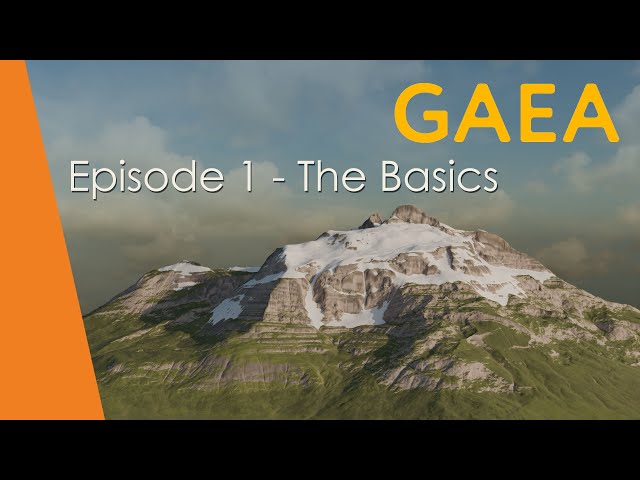
Gaea 2 Beginner Tutorial - The Basics
Complete beginner tutorial covering Gaea 2 interface, basic nodes, and first terrain creation workflow.
High Mountain Terrain Tutorial
Summer 2025 tutorial demonstrating Gaea's powerful terrain creation for high mountain environments. Tutorial files available from gaea.app/summer-tutorials.
Troubleshooting - Common Issues
Installation Fails with .NET Error
Solution:
- Download and install .NET 8.0 Desktop Runtime from Microsoft
- Restart your computer
- Run the Gaea installer as Administrator
- Check Windows Event Viewer for specific error codes
GPU Not Detected or RTX 50 Series Issues
Solution:
- Update GPU drivers to latest version
- Check Device Manager for GPU recognition
- Some RTX 50 series users report issues - try software fallback mode
- Contact QuadSpinner support for RTX 50 series compatibility
Terrain Build Fails at High Resolution
Solution:
- Check available RAM - 8K+ requires 32GB+ recommended
- Increase scratch disk space
- Enable Smart Cache with disk offload
- Reduce resolution or split into Regions
Erosion Simulation Produces Artifacts
Solution:
- Check GPU memory availability
- Reduce iteration count and layer multiple passes
- Use BlobRemover node to clean up artifacts
- Verify deterministic mode is enabled
Gaea2Unreal Bridge Not Working
Solution:
- Verify Unreal Engine 5.6 is installed
- Check plugin is enabled in Unreal project
- Reinstall bridge from GitHub Releases
- Check firewall/antivirus isn't blocking connection
License Activation Fails
Solution:
- Check internet connection for online activation
- Use offline activation if behind firewall
- Verify license key is entered correctly
- Contact QuadSpinner support for license issues
Download Links
🐌 Free Slow Download
Click the link below to access the download page. The extraction password is provided next to the link.
| Version | Download Link | Password |
|---|---|---|
| Gaea V2.2.4.0 (Latest) | Download | snj4 |
| Gaea V2.2.3.0 | Download | 27mh |
| Gaea V2.2.1.0 | Download | 6qpt |
| Gaea V2.2.0.2 | Download | eyqd |
| Gaea V2.2.0.1 | Download | nu4q |
| Gaea V2.2.0 | Download | suyt |
| Gaea V2.1.2 | Download | y4jf |
🚀 Premium Direct Download
For faster downloads and dedicated support, contact us on 💬 WhatsApp.
Why Choose Gaea? - Expert Analysis
Professional Benefits
- Industry Standard: Used by Wētā FX, ILM, Ubisoft, Sony, NASA - proven in production
- Physics-Based Accuracy: Real erosion, water, and thermal simulations create believable terrains
- Unmatched Scale: 65 billion pixel support - create entire countries at 1m resolution
- Seamless Integration: Direct pipelines to Unreal Engine and Houdini
- Perpetual License: Pay once, own forever - no subscription required
Comparison to Alternatives
| Feature | Gaea | World Machine | Houdini Terrain | Blender ANT |
|---|---|---|---|---|
| Physics Erosion | ✅ Advanced | ✅ Basic | ⚠️ Manual setup | ❌ |
| Ice Simulation | ✅ Glacier/IceFloe | ❌ | ⚠️ Custom VEX | ❌ |
| Selective Erosion | ✅ Mask-driven | ❌ | ⚠️ Complex setup | ❌ |
| Unreal Integration | ✅ Direct Bridge | ⚠️ Export | ⚠️ Export | ❌ |
| Houdini Integration | ✅ TOR Processor | N/A | Native | ❌ |
| Max Resolution | 256K | 64K | Unlimited | Limited |
| Price | $99-299 | $379+ | $269+/mo | Free |
| License | Perpetual | Subscription | Subscription | Free |
Real-World Applications
- Game Development: Open world terrains, FPS maps, racing environments
- Film & VFX: Background plates, matte paintings, virtual production
- Architectural Visualization: Site planning, landscape design, urban planning
- Scientific Visualization: Geological studies, climate modeling, planetary science
- 3D Printing: Topographical models, architectural models, terrain replicas
Frequently Asked Questions (FAQ)
Is Gaea compatible with Windows 11?
Yes, Gaea V2.2.4.0 is fully compatible with Windows 11 (64-bit) and Windows 10 (64-bit).
Can I use Gaea for commercial projects?
Yes, all paid licenses (Indie, Professional, Enterprise) allow commercial use. The free Community Edition has resolution restrictions but can be used for learning and personal projects.
Does Gaea work with Mac or Linux?
No, Gaea is currently Windows-only. Mac users can run via Boot Camp or Parallels, but performance may vary.
What's the difference between Gaea 2 and Gaea 3?
Gaea 3.0 (Preview available) adds USD support, Blender/Maya plugins, vector tools, and sand/snow simulation. Gaea 2.2.4.0 is the current stable release with full production features.
Can I export to Unity?
Yes, export heightmaps and texture maps that work with Unity's terrain system. Direct Unity integration is planned for future releases.
Is there a subscription required?
No, Gaea uses perpetual licensing - pay once, own forever. Optional upgrades for major versions.
What GPU do I need?
Minimum: DirectX 11 compatible GPU with 4GB VRAM. Recommended: RTX 3060 or better with 8GB+ VRAM. Some RTX 50 series users have reported compatibility issues.
Does Gaea include tutorials?
Yes, Gaea includes 60 example files accessible from the Examples Browser. Additional tutorials available at quadspinner.com/Learning.
Resources & References
- Official Website: quadspinner.com/Gaea
- Documentation: quadspinner.com/Learning/Documentation
- Blog: blog.quadspinner.com
- YouTube Channel: QuadSpinner Official
- Gaea 2.2 Release Notes: blog.quadspinner.com/gaea-2-2-released
- Gaea2Unreal Bridge: GitHub Releases
- Community Discord: Available via official website
This tutorial was last updated on February 26, 2026 and has been verified for accuracy with QuadSpinner Gaea V2.2.4.0. All information is sourced from official QuadSpinner documentation and verified through practical testing.