
The new version adds the RE:Grade color grading plugin. The plugins are a one-click install full version, ready to use after installation. The best-known plugins from this developer are probably Twixtor Pro, the super slow-motion retiming plugin, and ReelSmart MotionBlur Pro (RSMB), the motion blur plugin. RE:vision Effects founders Pierre Jasmin and Peter Litwinowicz lead a group of outstanding computer scientists, artists, software programmers and industry experts dedicated to designing software solutions for almost any digital pixel manipulation problem.
Supported Win and Mac systems: Adobe After Effects CS6 – CC 2019-2020 Adobe Premiere Pro CS6– CC 2019-2020
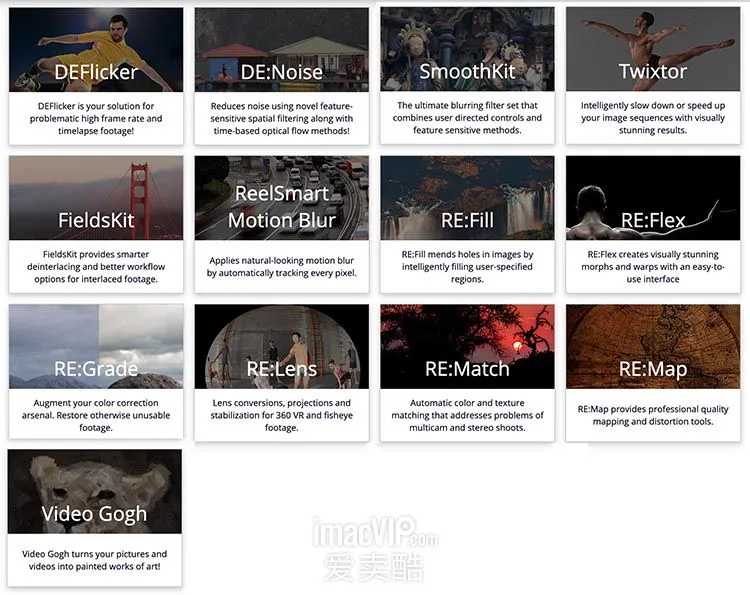
REVision Effects plugin list (Mac/Win versions): DE:Flicker v1.7.1 flicker removal plugin DE:Noise v3.3.0 video noise reduction plugin FieldsKit v3.6.0 animation deinterlacing plugin RE:Fill v2.4.0 smart repair and fill plugin RE:Flex v5.4.0 warp and morph/face morph plugin RE:Grade v1.1.0 color grading plugin (new) RE:Lens v2.1.2 fisheye and wide-angle lens distortion repair plugin RE:Map v3.2.0 UV mapping plugin RE:Match v2.3.1 color matching plugin ReelSmart Motion Blur Pro v6.2.0 motion blur plugin SmoothKit v3.5.1 noise reduction and skin smoothing plugin Twixtor Pro v7.2.0 super slow-motion retiming plugin Video Gogh v3.9.0 watercolor and oil paint plugin
Win installation method:
Copy the plugin files to C:\Program Files\Adobe\Common\Plug-ins\7.0\MediaCore\
Mac installation method:
Copy the plugin files to /Library/Application Support/Adobe/Common/Plug-ins/7.0/Media Core/



