
Overview
BeatEdit is a PR plugin for automatic music-rhythm beat-marker editing. BeatEdit 2 for Premiere Pro can automatically detect audio files and generate a timeline based on the music’s beats and drum hits, then you select the footage that needs editing and the editing is completed automatically. It also supports automatic/manual selection of beat positions and editing of the start position, making editing simple. Includes a video tutorial.
Create better edits in sync with the music! Create beat markers automatically to assist manual editing or even create automatic edits in sync with the music.
Plugin features:
- Powerful, state-of-the-art beat detection
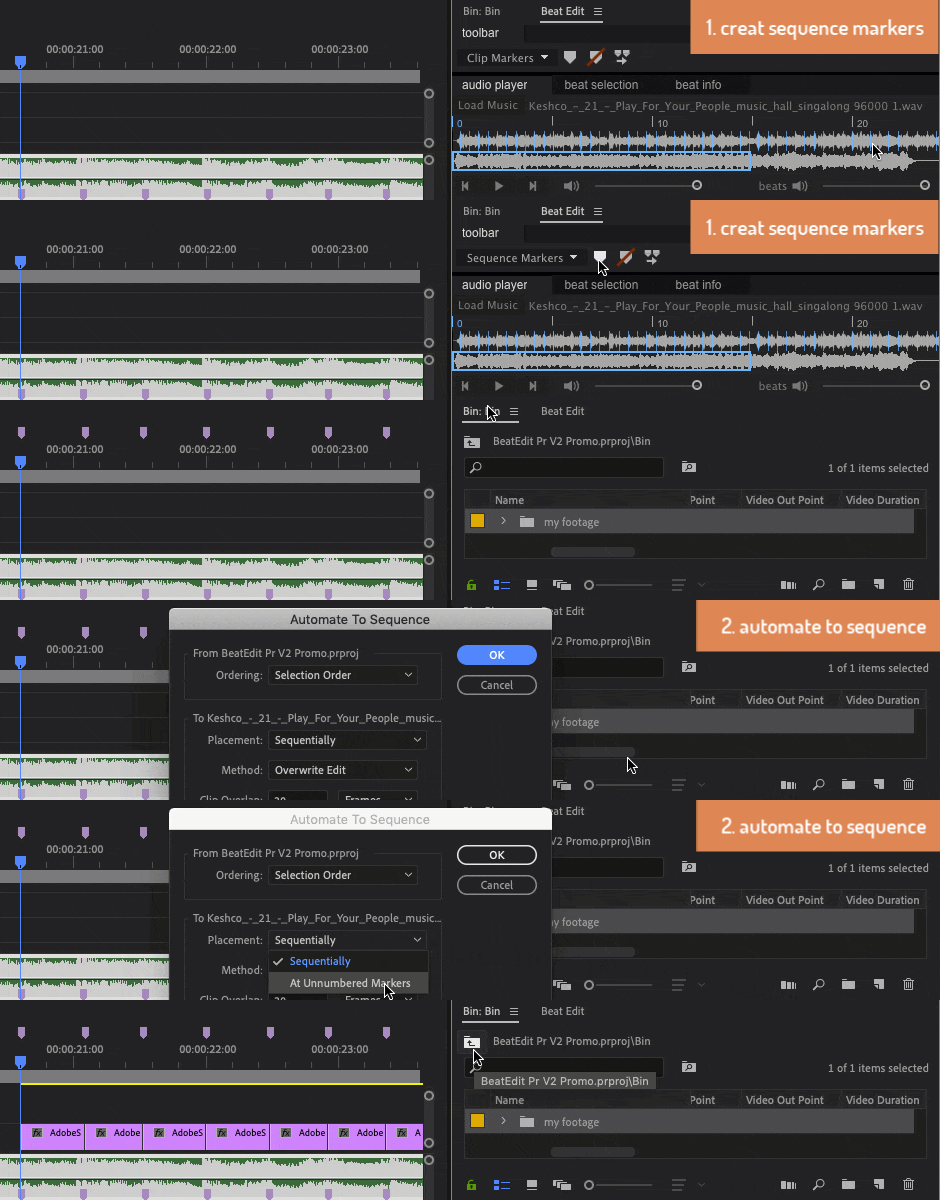
- Create sequence markers or clip markers
- Compatible with the automatic sequencing feature in Premiere Pro
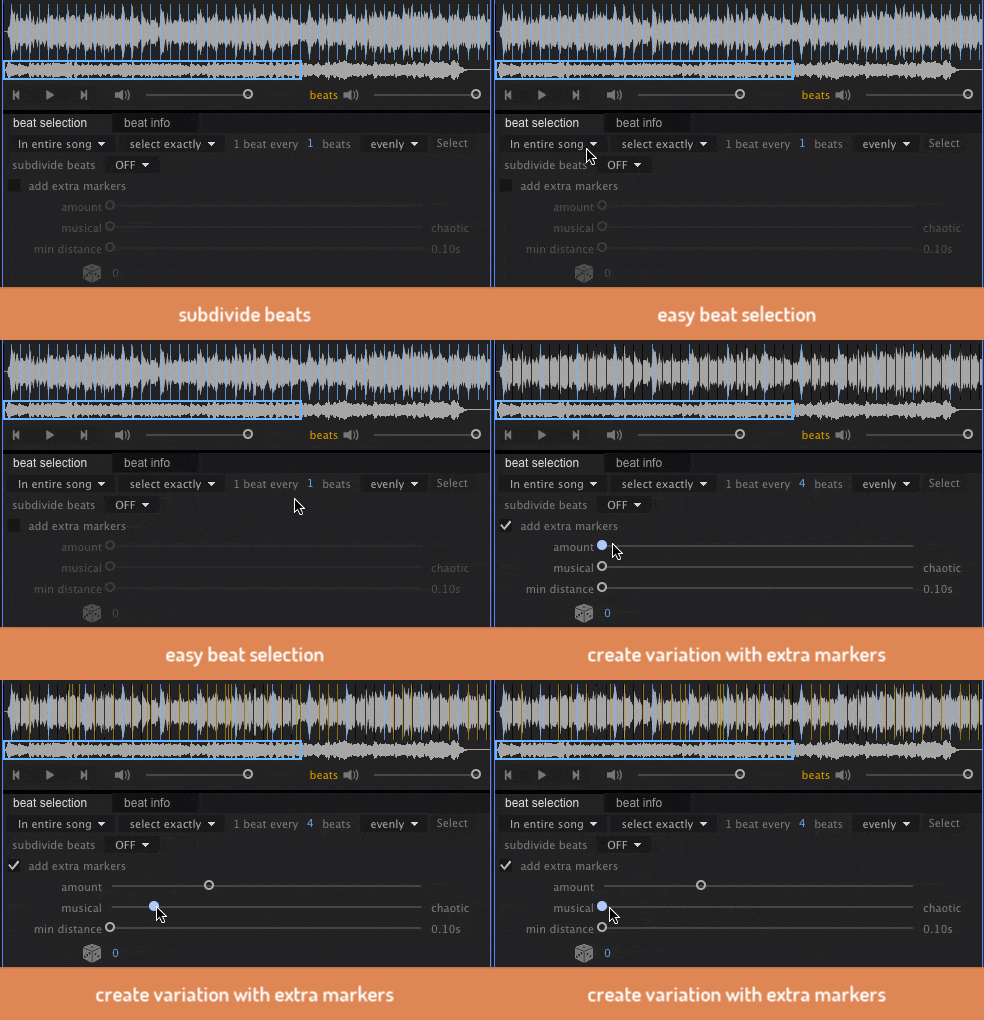
- Easy beat selection
- Detect only beats or other rhythmically relevant peaks for more variation
- Batch processing of markers (create, move, delete)
Edit in sync with the music:
Automatically create slideshows and rough cuts that change with the beat
Full control
BeatEdit provides detailed controls for choosing the beats you want to use. You can subdivide beats to create faster styles and select beats very easily. To create more variation, BeatEdit can also create extra markers at positions that are not beats but other rhythmically relevant peaks in the music.
What’s new in V2
- Load music directly from the Premiere Pro Sequence
- Move marker tool
- Beat info panel (see bpm, number of selected beats, etc.)
- Work area support (create, move or delete markers only within the work area)
- New user interface with resizable sections
- Supports Adobe Premiere Pro 13.1.5 (CC 2019) and later versions
- Correctly detects beats at the beginning of a song
- Performance improvements and bug fixes
Powerful beat tracking technology
BeatEdit relies on highly stable beat tracking technology developed by music research groups around the world. The beat tracker used (IBT) was developed by the Sound and Music Computing group at INESC University of Porto. BeatEdit also relies on the MARSYAS (Music Analysis, Retrieval and Synthesis for Audio Signals) framework developed under the guidance of George Tzanetakis, Associate Professor at the University of Victoria.
Limitations
BeatEdit only works with audio files (wav, mp3). It cannot load audio from video clips, and it does not take into account any effects or modifications you apply to the audio on the timeline (such as rate stretching). If you need to work with rate-stretched audio or audio tracks from video files, you need to export them as wav files first and then import them into BeatEdit.
Installation method:
-
Copy the com.mamoworld.BeatEditPr folder to the following location: Win : C:\Program Files (x86)\Common Files\Adobe\CEP\extensions\ Mac : system drive/Library (called 资源库 in Chinese)/Application Support/Adobe/CEP/extensions
-
On Win, run Add Keys.reg; on Mac, run install-as-admin
-
Open PR, and from the software’s top menu Window - Extensions, open the BeatEdit – Chinese localized script
info
If the Mac version shows an error, run the following two pieces of code separately in Terminal:
[After pressing Enter on the first piece of code, you should be prompted to enter your password (the password will not be displayed when typing in Terminal), while the second piece of code should not require it. When done, close Terminal, restart PR and the plugin should work normally.]
sudo chmod 755 /Library/Application\ Support/Adobe/CEP/extensions/com.mamoworld.BeatEditPr/payloads/ibtMac mac@macs-mbp ~ %
sudo chmod 755 /Library/Application\ Support/Adobe/CEP/extensions/com.mamoworld.BeatEditPr/payloads/onsetsMac
tip
Supports Win/Mac systems: Premiere 2026, 2025, 2024, 2023, 2022, 2021, 2020, CC 2019, CC 2018, CC 2017, CC 2015.3



