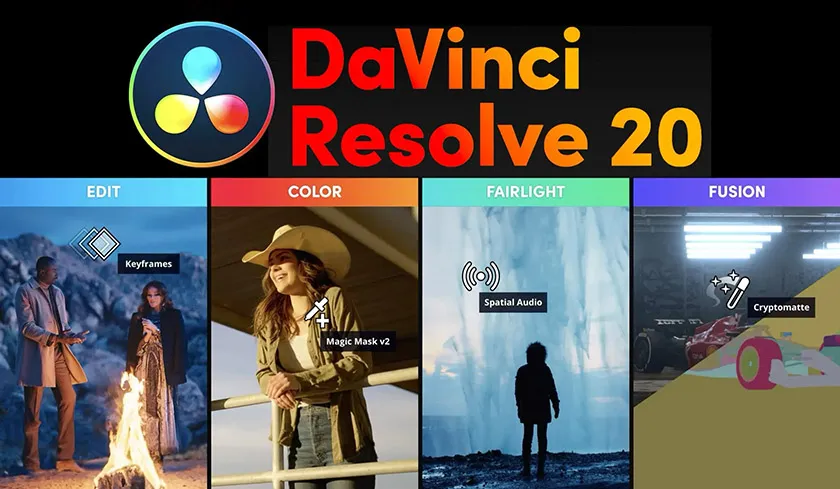
Blackmagic Design released a major DaVinci Resolve 20 update on April 4, adding more than 100 features and AI tools such as AI IntelliScript, AI Animated Subtitles, AI Multicam SmartSwitch and AI Audio Assistant, plus keyframe editing, a voiceover palette, multilayer compositing tools, new optical flow vector tools, and major updates to Magic Mask and depth maps.
The release notes mention that DaVinci Resolve Studio 20 also introduces powerful new features for Apple Immersive Video on Apple Vision Pro. Filmmakers can easily edit, grade and mix spatial audio, and work with Apple Immersive Video shot on the new Blackmagic URSA Cine Immersive camera, which is said to have started shipping to its first customers.
In addition, Fusion’s PanoMap, spherical stabilizer, LatLong patcher, 3D VR camera and 3D viewer have been updated to support 180-degree views for creating immersive content. Customers can also render 3D scenes to VR180 using the spherical camera and Renderer3D, simplifying the production workflow.
New features in DaVinci Resolve Studio 20
DaVinci Resolve 20 introduces more than 100 new features, including a range of powerful AI tools designed to help at every stage of the workflow. AI IntelliScript creates timelines from a text script, AI Animated Subtitles animates text as people speak, and AI Multicam SmartSwitch assembles a timeline from multicam angles based on speaker detection. The Cut and Edit pages add a dedicated keyframe editor and voiceover panel, while AI Audio Assistant analyzes your audio and intelligently creates a professional mix. The Fusion page offers many advanced multilayer compositing workflows. The color warper now includes Chroma Warp, and Magic Mask and depth maps have received major updates.
Software support: Windows, macOS
Software version: Studio, Win/Mac v20.0B1 Beta (Build23)
DaVinci Resolve Studio 20.0B1 (Build23) software update
This software update installs DaVinci Resolve Studio 20 Public Beta and adds more than 100 new features and AI tools, including AI IntelliScript, AI Animated Subtitles, AI Multicam SmartSwitch and AI Audio Assistant, as well as keyframe editing, a voiceover panel, multilayer compositing tools, new optical flow vector tools, and major upgrades to Magic Mask and depth maps. DaVinci Resolve Studio 20.0B1 adds or updates the following features:
Key new features
- Improved keyframes with a dedicated curve view and timeline drawer.
- Voiceover tools with recording and monitoring options.
- Import Blackmagic Cloud shared folders into the media pool.
- AI IntelliScript creates timelines from a user-supplied script.
- AI Magic Mask v2 with a brush.
- AI Dialogue Matcher matches clip tone, level and reverb.
- AI Audio Assistant automatically creates a finished mix.
- AI IntelliCut removes silence and checkerboards speakers.
- Depth image compositing toolset.
Cut page
- Voiceover palette with prompts, speech tools and a teleprompter.
- Ripple trim audio on secondary tracks.
- Replay multiview now shows previously used camera angles.
- Clicking the time button lets camera buttons pre-roll the replay.
- Automatic media bin re-sync now supports still images and sequences.
- Live overwrite now supports edit keys and a search dial.
- Live overwrite of multi-source and sync bins by mouse drag.
- Trimming with safe edit avoids overwriting adjacent clips.
- Media pool metadata panel for quickly reviewing selected clips.
- Ability to copy, paste and remove attributes from timeline clips.
- Support for dynamic trim mode with JKL controls.
- Full-featured audio mixer.
- Mini timeline now includes a context menu.
Edit page
- Voiceover tools with recording and monitoring options.
- AI Multicam SmartSwitch for automatic angle switching.
- AI VoiceConvert with built-in and user-trainable models.
- Source tape support.
- Ability to view and edit the timeline in the source viewer.
- Multicam creation now supports reference audio tracks.
- Open compound clips from the timeline matched to the playhead position.
- Access timeline settings from the timeline tab context menu.
- User preference for 24-hour timecode.
Cut and Edit pages
- Improved keyframes with a dedicated curve view and timeline drawer.
- Import Blackmagic Cloud shared folders into the media pool.
- AI IntelliScript creates timelines from a user-supplied script.
- AI Dialogue Matcher matches clip tone, level and reverb.
- AI Music Editor automatically edits music to the desired length.
- AI Animated Subtitles highlight or animate spoken words.
- AI SuperScale now includes 3x and 4x enhanced upscaling.
- AI beat detection displays music beats and allows beat snapping.
- New optimized UI layout option for vertical video.
- Custom grids for sorting and organizing media pool thumbnails.
- Text+ paragraph, line break and boundary tools.
- Multi-text tool with layers and easy transform, trim and wrap controls.
- Subtitle tracks now support Fusion templates for styling.
- Selectively sync original media using proxy-only cloud sync.
- Imported PSDs can now be split into separate layers.
- Support for Alert Red viewer background mode.
- Transcription engine now offers expanded language support.
- Smooth Cut now supports AI Speed Warp.
- Export audio transcripts with speakers and timecode.
- Export transcripts with improved phrase and sentence segmentation.
Fusion page
- Depth image compositing toolset.
- Multilayer pipelines for OpenEXR, PSD and stereoscopic 3D.
- Vector warp toolset for image repair and cleanup.
- Support for 180 VR.
- 3D scene dome light.
- Native Cryptomatte workflow support.
- View color page grades in the media output node.
- Faster GPU-based PanoMap and spherical stabilizer tools.
- Ability to search tools by effect category.
- User-selectable starting frame for compositions.
Color page
- AI Magic Mask v2 with a brush.
- AI Resolve FX Depth Map v2.
- Chroma Warp color warper grading.
- Resolve FX Warper with new spline warp controls.
- Open Color IO support for Resolve FX.
- New optimized UI layout option for vertical video.
- Viewer overlay for remote monitoring.
- Stream and monitor H.265 4:2:2 on supported hardware.
- Samsung Log support.
- ACES 2.0 support.
- Ability to generate HDR lighting level PDF reports.
- LUTs and color spaces can now be changed in multi-user projects.
- Node layer controls in the advanced panel.
- Improved lift, gamma and gain micro panel sensitivity.
Fairlight page
- AI Audio Assistant automatically creates a finished mix.
- AI IntelliCut removes silence.
- AI IntelliCut converts dialogue into checkerboard dialogue by speaker.
- AI IntelliCut generates ADR cues using transcribed speaker information.
- Clip EQ now has 6 bands.
- EQ and Level Matcher process-matched tone and clip levels.
- EQ and Gain are now also available as Fairlight FX plugins.
- Fairlight Chain FX for creating and recalling frequently linked plugins.
- Drag track and bus headers to move them in the timeline.
- Automation now supports per-channel mode switching.
- Trim automation now stays active during mixing.
- Improved view presets store multiple parameters.
Codecs
- Apple ProRes encoding support on Windows and Linux.
- Encode MV-HEVC without spatial video metadata.
- MV-HEVC encoding support on Nvidia systems.
- Support for side-by-side stereoscopic 3D media decoding.
- Side-by-side display mode for stereoscopic 3D clips in the source viewer.
- Editable spatial video metadata properties in the Inspector.
- GPU-accelerated H.265 4:2:2 encoding on supported Nvidia systems.
- GPU-accelerated H.265 4:2:2 decoding on supported Nvidia systems.
- Support for growing TS, MTS and M2TS files as media streams.
- Interlaced rendering support for frame-based formats.
- HT JPEG 2000 decoding support for EXR.
- Quick Export dialog with custom user preset list and list view.
- Ability to assign custom icons to user presets in the Deliver page.
- Sony Burano 2.0 support.
- RED SDK 8.6 support.
- Audio normalization for Dropbox presets.
- Improved PNG support with HDR and SDR signals.
General application
- User-definable location for media created in Resolve.
- Resolve FX AI settings expander.*
- Additional download manager for AI models and more.
- Updated remote monitoring client with bitrate display.
- Remote Monitor can now be installed on macOS alongside DaVinci Resolve.
- User preference for automatic cache management.
- Ability to enable dual-screen windows on ultrawide monitors.
- OCIO 2.4.2 and ACES 2.0 support.
- Preference to import all clips with multi-mono audio configurations.
- Bluetooth connection status pop-up dialog.
- Ability to filter the fonts visible in Text+.
- Data burn-in option for synced audio.
- Support for Nvidia Blackwell GPUs with CUDA 12.8.
- Overall performance and stability improvements.
Notes before installation
- For DaVinci Resolve 20.0B1 we have made every effort to keep project libraries compatible with DaVinci Resolve 19.1.4. While this lets you access project libraries with 19.1.4, individual projects created or opened in 20.0B1 can no longer be accessed in 19.1.4.
- We recommend a full project library backup plus individual project backups before opening projects in 20.0B1.
System requirements
- Windows 10 and Windows 11 (please keep your system up to date)
- macOS 14 Sonoma or later
- Rocky Linux 8.6 or CentOS 7.3 or later
- When using Fusion, 16 GB of system memory is recommended, with a recommended minimum of 32 GB