Overview
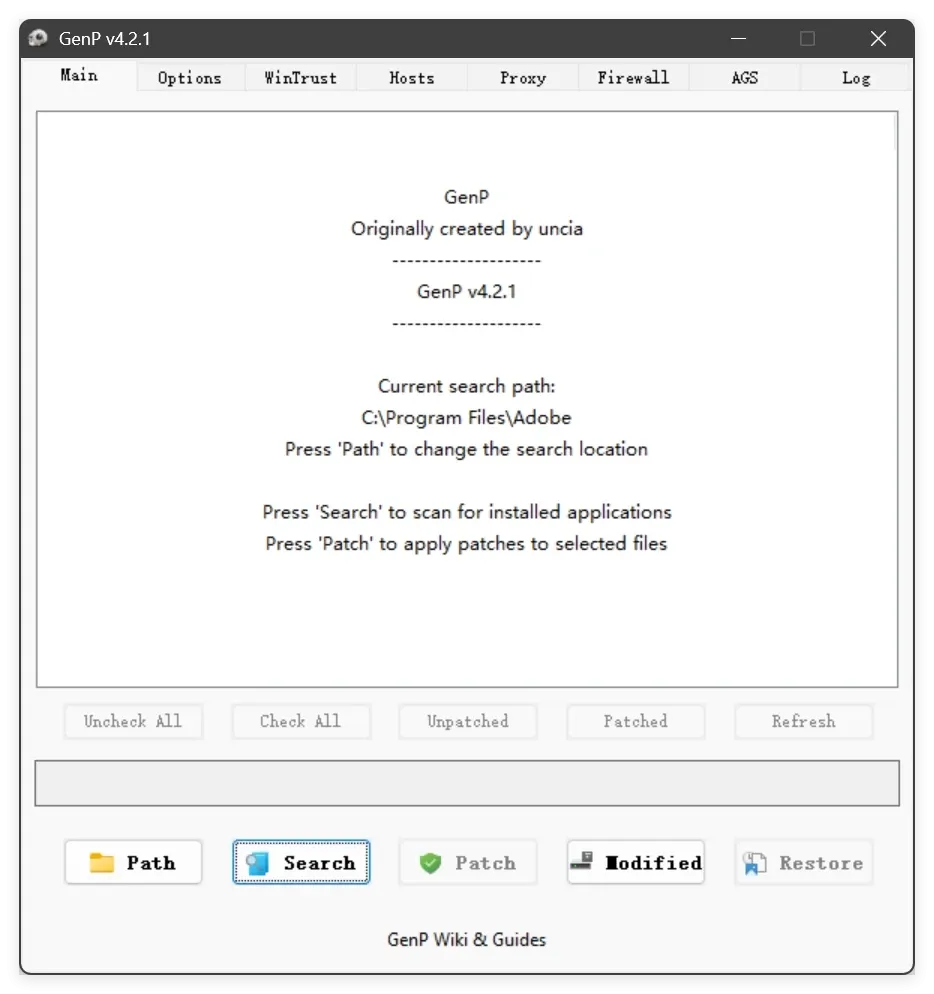
The latest Adobe GenP 4.2.1 CGP Community Edition can crack and activate the Adobe series software with one click, and supports activation of the entire Adobe family of applications. Adobe GenP is an Adobe product activation tool for the Windows platform, specially designed to activate all Adobe software versions from 2019 to 2026 on Windows systems. The GenP release was created by MikeVirtual (CGP forum).
How to use:
- Disable your security software to prevent false positives. (If you use the built-in one, just temporarily turn off ‘Real-time protection’ or set up an exclusion.)
- Download and install the latest ACC; during installation, do not install the genuine-validation service, sign in to your account (register one for free if you don’t have an account), then close ACC.
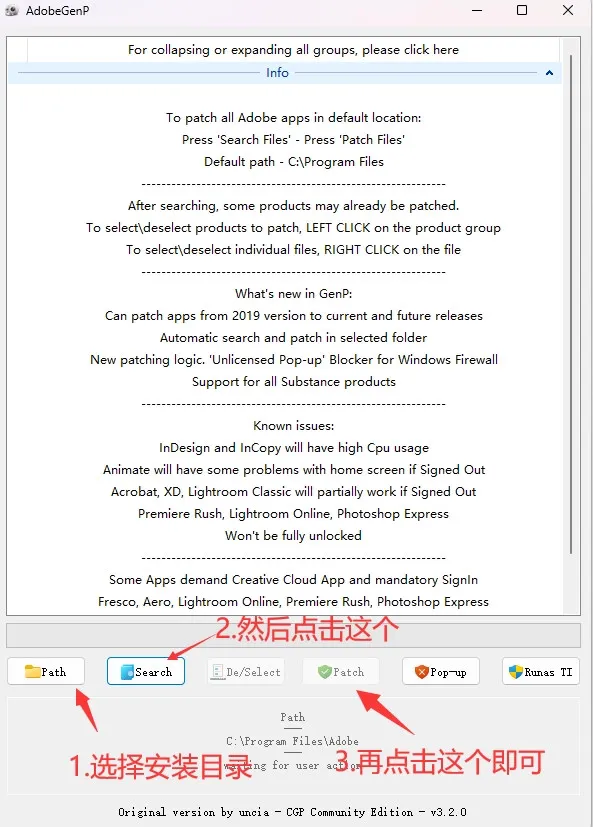
- Patch ACC: Open AdobeGenP.exe in the Release folder, then proceed as follows: 2.1 If this is your first time installing Adobe software, simply click ‘Search’ to patch ACC (it will only find ACC), then click ‘Patch’. 2.2 If Adobe-related software is already installed on your computer, click ‘Path’ and point it to the ACC installation directory (default: C:\Program Files (x86)\Common Files\Adobe), then click ‘Search’, then click ‘Patch’.
- After patching, run ACC and download the Adobe applications you want to install.
- Run GenP, then click ‘Search’ again, tick the Adobe software you want to crack, then simply leave everything selected by default and click ‘Patch’.
- Enjoy.
Notes:
Adobe GenP adds two new tabs, ‘Options’ and ‘Pop-up Tools’, for configuring related settings — for example, to solve licensing pop-up issues.
If you receive a pop-up about licensing, run GenP and click the ‘Pop-up’ button. (Note: an alternative hosts-blocking method can also be used: https://www.cgzy.net/36377.html)
GenP v4.2.1 works with:
- Acrobat
v25.1(Latest:v26.001.21745) - After Effects
v26.3 - Audition
v26.3 - Bridge
v16.0.6 - Camera Raw
v18.4.1 - Character Animator
v26.0 - Creative Cloud
v6.10.0.252.3 - Dimension
v4.1.8 - Dreamweaver
v21.8.1 - Illustrator
v30.6 - InCopy
v21.4.1 - InDesign
v21.4 - Lightroom Classic
v15.4.1 - Media Encoder
v26.3.1 - Photoshop
v27.8 - Photoshop Elements
≥v26.0(Latest:v2026.3–Build: 20260424.PSE.c44cedcc) - Premiere Elements
≥v26.0(Latest:v2026.3–Build: 20260408.PRE.3cc9b670) - Premiere Pro
v26.3 - Substance 3D Designer
v16.0.4 - Substance 3D Modeler
v1.22.7 - Substance 3D Painter
v12.1.1 - Substance 3D Sampler
v6.0.2 - Substance 3D Stager
v3.1.8
Update log:
Update log:
V4.2.1
Corrections:
- General fixes: Improved stability and reliability.
- Legacy version download reliability: Clearer messages are shown when Adobe blocks requests, and downloads and installs are more reliable.
New features:
- Proxy targeting (per application): The 'Proxy' tab now includes a 'Targeting' button. By default, the proxy runs in global mode, intercepting all Adobe traffic, which is the recommended setting since it also covers Adobe's shared licensing service. You can optionally switch to targeted mode and tick up to four installed applications to limit interception to those applications only. Your selection is saved in
config.ini. - Combined 'Start/Stop Proxy' button: The previous 'Toggle Run' and 'Toggle Proxy' buttons are now merged into a single button that can start the proxy and enable the Windows system proxy at the same time, or stop both at once.
- Centered pop-up windows: GenP's dialogs and message boxes now open at the center of the GenP window instead of the middle of the screen.
- Legacy downloads are verified standalone installers: Each package is size-checked and confirmed complete before installation (missing files are reported instead of passed through), and the required Adobe installer components are fetched automatically each time, so downloaded versions install cleanly without manual setup.
V4.0.4
Selective restore backup retention:
- Fixed a bug where, when restoring some files from an app group (for example, two of four patched files), the
.bakfiles of other patched files in the same folder would be deleted. Now these backup files are kept as long as the corresponding patched files are still in use, so the remaining files can be restored later without reinstalling the app. To ensure full transparency, the activity log now also lists which backup files were kept and which were deleted during a restore operation.
Pop-up fixes:
- Fixed pop-up issues that some applications could show during use after the most recent Adobe version update. The patcher has been updated to bypass the underlying check.
V3.8.0
- Fixed PS 27.2+
- No new version needed — use with the 3.7.1 executable
v3.7.1
- Even better
- Happy Halloween (from the developer)
v3.7.0
*Fixed the initial v2026 apps
v3.6.9
- Corrected Photoshop Elements (thanks to m0nkrus for the heads-up)
- Fixed Photoshop 2025 v26.10.0.7
v3.6.9 added a new filename to the TargetFiles list to complete the patch for Photoshop Elements. The pattern already existed and worked, but GenP was not searching all files. The issue of the latest Photoshop crashing during startup has also been fixed.
There is no new pop-up fix update yet. The fix is kept here for now. If needed, others can use the m0nkrus version. The pop-up tools built into GenP should also work. Thanks to @xanax for the ongoing support, and to Drovosek n m0nkrus (and the community) for their tireless work and testing.
v3.6.8
- Bug fixes
v3.6.7
- CC Desktop v2.7.0.278 fixed
- LR Classic 14.4 fixed
- Bug fixes
v3.6.6
- Added initial support for Photoshop/Premiere Elements 2025 25.x
- Bug fixes
- Streamlined the build process
v3.6.4
- InCopy/InDesign no longer need WinTrust when applying the anti-popup patch
- Updated/added patches to remove the trial-expired banner in some applications
- Removed Acrobat from the WinTrust scan
- Minor fixes
v3.6.3
- Updated the previous anti-popup patch, now including Illustrator
- Added the Acrobat anti-popup patch
v3.6.2
- Popup Tools -> Runtime Installer section updated.
I noticed that some applications or versions may not like having their RuntimeInstaller.dll file renamed (deleting or renaming the file removes the pop-up). This rename method was added in v3.6.0/1 because After Effects and Premiere Pro pack their files with a custom UPX, so the new patch/pattern provided by @xanax could not be found.
As of v3.6.2, I added a custom UPX binary to unpack these files, and Popup Tools -> Runtime Installer -> the Unpack button will now do this automatically (instead of simply renaming the file). After unpacking the file, you can patch it with AdobeGenP to apply the xanax popup patch (or any other patch) to the file.
v3.6.1
- Default path changed to ' C:\ Program Files \ Adobe' (from C:\ Program Files)
- Renamed the ' -popup' command flag to ' -updateHosts'
- Moved the popup button to the Popup Tools tab and renamed it to 'Update hosts'
- Redesigned Popup Tools tab
*Redesigned AG removal
*Other firewall tools
*Improved update hosts
*New 'Runtime Installer' section
*New 'Wintrust' section (thanks to team V.R!) - Added new anti-popup patches (thanks @xanax!)
- Added config.ini version
- Added additional log output
- Updated patches fix the current AE/AU/ME/PR Betas and upcoming stable builds (v25.3+)
v3.5.0
- Various UI changes/fixes
- Dropped support for Fresco/XD; RunAsTI is no longer needed
- Redesigned the 'Adobe Genuine Services' feature
- Redesigned the 'Pop-up' feature, now using hosts instead of the Windows firewall
- Added the '-popup' command-line flag for unattended popup-blocking updates via scheduled tasks
- Added a hosts list URL option
- Fixed supported application versions 'breaking' after an update (requires re-patching 'Creative Cloud')
- Fixed recent stable/beta applications
v3.4.2
- Commented out the 'UnlicensedPS' and 'UnlicensedIllustrator2023/b' patches to fix crashes in some applications.
- These should have been removed long ago, since they did not solve the unauthorized/genuine pop-up problem some applications received — and recently they caused some newer application versions to crash at startup.
- If I get the pop-ups, maybe they can be patched properly without HOSTS/firewall blocking.
- As long as nothing else changes (famous last words...), this should be ready for the stable v2025 applications, which should drop any time now.
v3.4.1
- Fixed the 'cannot allocate memory' error when patching large binaries
v3.4.0
- Improved the fix for crashes during application startup
- Added the Premiere Pro 24.6.1/25 Beta blank home screen fix
- Added MD5 checksum output for each patched file in the log – may be useful when troubleshooting [enable/disable in the Options tab or config.ini]