Overview
Adobe Lightroom Classic 2026 is a powerful desktop application designed for photographers and image editing enthusiasts, developed by Adobe. It combines photo management with professional-grade editing to help users efficiently import, organize and optimize large numbers of images. As a non-destructive editing tool, Lightroom Classic lets users freely adjust parameters such as exposure, color and detail while keeping the original files intact. Its powerful features include keyword classification, batch processing, preset application and local adjustment tools, greatly improving the efficiency of the photography workflow. In addition, it integrates seamlessly with Photoshop and supports multiple export formats, suiting everyone from professional photographers to hobbyists. Whether you are processing RAW files or managing a huge photo library, Lightroom Classic is the ideal choice for photo post-processing.
Windows installation:
-
Disable antivirus first so the keygen is not deleted by mistake
-
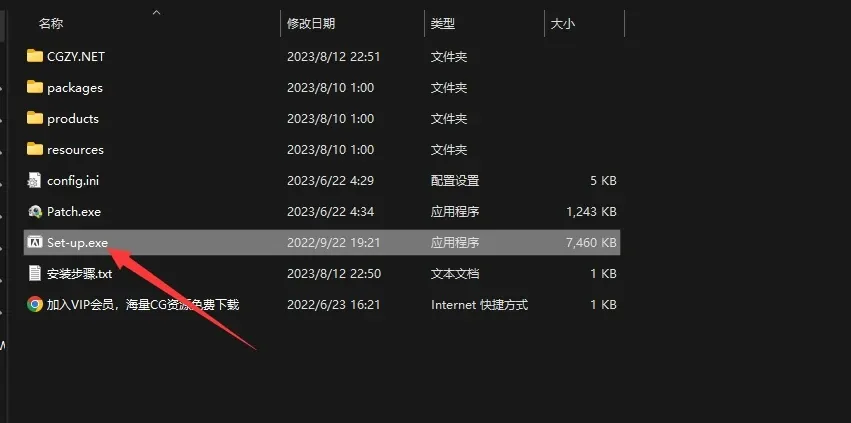
Click Set-up.exe to start the installation
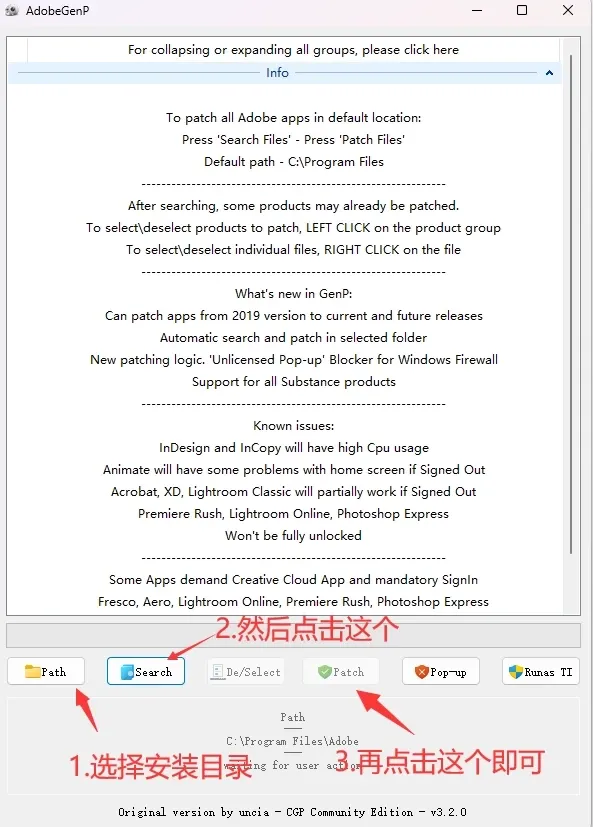
When the installation finishes, right-click AdobeGenP.exe and run it as administrator, click Path in the bottom-left corner and select the software’s installation folder, then click Search — it will automatically find all installed Adobe applications in that folder. Tick the applications you want to patch and click Patch.